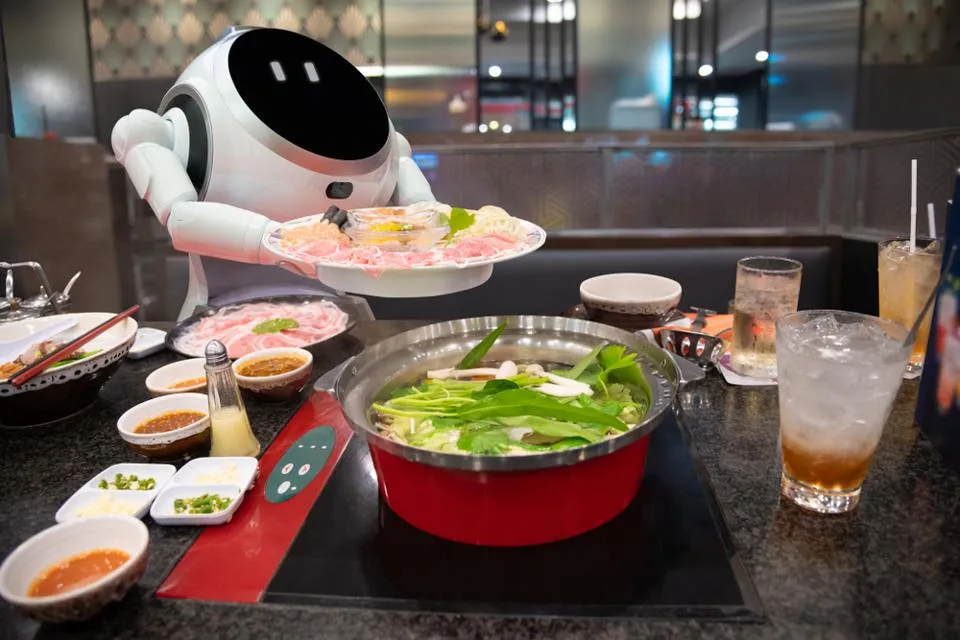



What is advanced restaurant technology? It is software and devices that do restaurant jobs faster than pen and paper, with fewer mistakes. That covers taking orders, running the kitchen, keeping stock and bringing customers back. This guide covers 13 tools worth knowing for Indian outlets.
You do not need all of them. Each one fixes a different problem, so the right first tool depends on how your outlet runs.
This guide explains what each tool does and how it helps your day. It also shows how AI now answers everyday questions for owners, and which tool to add first.
Key Takeaways
- This guide covers 13 advanced restaurant technology tools for ordering, the kitchen, service, customers and payouts.
- The POS comes first, because most other tools connect to it. Pick one that keeps billing without internet.
- Some newer POS software now uses AI to answer sales questions in plain words, suggest what to reorder and draft review replies.
- A QSR counter, a fine dine floor and a cloud kitchen usually need different tools first.
What Is Advanced Restaurant Technology?
Advanced restaurant technology means a POS plus the add-ons that connect to it. Each one replaces a paper or manual step, such as an order slip, a stock register or a payout spreadsheet.
Why Does Advanced Restaurant Technology Matter in India?
The right tools can save time on each order and cut the mistakes that cost money. They also give you data you can act on, such as which dishes sell and which customers stop coming.
Indian guests are already used to paying by phone. UPI handled 24.07 billion (2,407 crore) payments in September 2026. That figure comes from the National Payments Corporation of India, as reported by Outlook Money.
Tools that work through the guest’s phone, such as QR ordering and loyalty offers on WhatsApp, fit that habit.
What are the 13 Advanced Restaurant Technology Tools?
The 13 tools are a POS plus 12 add-ons, grouped by the job they do. The POS records every bill. Ordering tools take the order, and kitchen tools help cook it and track the stock. Service tools look after the table or the pickup, customer tools bring the guest back, and reconciliation checks the delivery payouts.
Order QR ordering, kiosk, captain app, online orders Kitchen Kitchen display, inventory Service Reservations, calling device, token display Customers Loyalty and WhatsApp, AI review replies Payouts Order reconciliation Where the 12 add-ons fit in running an outlet. The POS records every bill. Not every order uses every tool: dine-in guests use table service, and takeaway guests use pickup.Not every outlet needs a tool at every stage. Each section below says what the tool does and which outlets need it most.
The base
1. A POS that keeps billing offline
A POS that keeps billing offline lets you keep serving when the internet drops, then syncs the bills once it is back. It is the base for every other tool, because it holds your sales, menu and reports.
Before you buy any POS, check that it bills without internet. Our page on the offline restaurant POS explains how offline billing works.
Best for: every outlet, since it is the base for the rest.
For ordering
2. QR code ordering at the table
Guests scan a QR code on the table, see the menu on their phone and place the order themselves. The order reaches the POS without a waiter, so staff do not have to write it down.
It helps most at peak hours, when there are more tables than waiters. Our guide to setting up QR code ordering walks through the steps, and the QR code ordering page shows how it works.
Best for: cafés and food courts with more tables than staff.
3. A captain app for tableside orders
A captain app lets waiters take orders on a phone or tablet at the table. The order reaches the kitchen at once, without a walk back to the billing counter.
Some captain apps also let waiters take UPI payment at the table. Read about the captain ordering app, or our guide to how captain ordering works.
Best for: fine dine and casual dining outlets with a busy floor.
4. A self-service kiosk
A kiosk is a touch screen where guests browse the menu, order and pay without waiting at the counter. Counter staff can then focus on handing over food.
A self-service kiosk also shows the whole menu at the guest’s own pace, which makes it easier to add a side or a drink. Our guide to setting up a self-ordering kiosk covers placement and menu setup.
Best for: QSRs with long lunch queues.
5. Online order integration
Online order integration brings orders from delivery apps onto your POS screen, next to walk-in orders. Staff then do not have to retype each order or watch several tablets.
Online order management software puts all these orders in one list. Some systems also connect to the ONDC network (Open Network for Digital Commerce), a government-backed network for online buying and selling, including food orders.
Best for: any outlet that takes delivery orders.
For the kitchen and stock
6. A kitchen display system (KDS)
A kitchen display system shows kitchen order tickets (KOTs) on a screen instead of paper. Cooks see each order and mark it done, so orders are less likely to get lost under a pile of slips.
A kitchen display system shows dine-in and online orders on the same screen. Read our KDS guide before you set one up.
Best for: QSRs and cloud kitchens with many orders at once.
7. Inventory management
Inventory software tracks your stock and warns you when it runs low, so you reorder before an item runs out. Once each recipe is set up, it also takes stock out as each dish is billed.
Inventory management software can also track wastage, so you see where stock is lost, and some systems now use AI to suggest what to reorder. Our restaurant inventory guide covers the basics.
Best for: outlets with costly ingredients, and owners running more than one outlet.
For service and pickup
8. Table reservations
A table reservation system takes bookings in one place and matches each party to the right table. The table then shows as taken on your POS floor view.
A table reservation manager means fewer double bookings and no paper diary. Our guide to a table reservation system explains how it works.
Best for: fine dine outlets that take bookings.
9. A wireless calling device
A calling device is a small button on each table that guests press to ask for a waiter, water or the bill. The request then reaches your staff.
A wireless calling device means guests do not have to wave or shout across the room. Our comparison of a calling bell vs device shows the difference.
Best for: fine dine outlets that want a quieter floor.
10. A token display for pickup
A token display is a screen that shows which orders are ready. Takeaway guests and delivery riders can check the screen instead of asking the counter staff.
A token management display keeps the pickup area calmer at rush hour. Our token management guide explains how to run one.
Best for: QSR counters with both takeaway and delivery pickups.
For customers
11. Loyalty and WhatsApp marketing
A points-based loyalty programme adds points to each bill that carries the customer’s phone number. Marketing tools then send offers on WhatsApp to the right group, such as regulars or customers who have not visited in a while.
Marketing tools, such as a restaurant marketing manager, send these WhatsApp campaigns from ready templates. Our loyalty programme ideas compare the main types.
Best for: outlets with regulars, such as cafés and QSRs near offices.
12. AI tools for reviews and feedback
AI tools now draft some of the writing that used to take staff time: replies to reviews, and summaries of what customers say in feedback. You see the main complaints at a glance.
The best tools bring reviews from Google and the delivery apps into one place, so fewer are missed. You still read each AI-drafted reply before it goes out.
Best for: busy outlets that get more reviews than they have time to answer.
For money
13. Online order reconciliation
Reconciliation checks what each delivery app paid you against the orders in your POS. It shows matched orders, missing orders and amount differences, so you know what to follow up.
Online order reconciliation replaces the spreadsheet many owners keep for this. Our guide to the restaurant day-end report shows how to close each day.
Best for: cloud kitchens and any outlet with a large share of delivery orders.
How Does Petpooja Use Advanced Restaurant Technology?
Petpooja, restaurant management software founded in Ahmedabad in 2011, runs billing on its POS, and the 12 add-ons above connect to it. The POS comes in different versions, and which tools run together depends on the version you choose.
Petpooja also adds features that answer owners’ everyday questions. Some use AI, and others automate routine reports. For an owner, that means fewer reports to open: check yesterday’s numbers in the morning, ask a quick question before ordering stock, and let the system draft review replies.
Ask Me Anything: answers about your sales in plain words
Ask Me Anything is an AI assistant at the top of the Petpooja dashboard. You type a question such as “What were my top-selling items yesterday?” or “Show me yesterday’s sales by hour”, and it answers from your own outlet data. You do not have to find the right report first.
AI inventory: what to reorder, and how much
On Petpooja’s inventory dashboard, smart purchase orders use AI to study past usage and suggest when to reorder and how much. That way you avoid both running short and overbuying.
AI upsell suggestions on the captain app
While a waiter takes an order on the captain app, AI suggests dishes to recommend. A waiter who is new to the menu can still offer the right side or dessert.
Daily Snapshot: yesterday’s numbers every morning
Daily Snapshot is an automated summary of the previous day, shown on the dashboard. It covers sales against the same day last week, sales by channel, customer reviews, and money lost to discounts, cancelled orders and waived-off bills. You see how yesterday went before the day starts, without pulling a single report.
AI review replies with Petpooja’s Marketing Manager
Petpooja’s Marketing Manager, the product behind the marketing manager link in tool 11, drafts review replies with AI and summarises feedback. You answer more reviews in less time, and the main complaints are easy to spot.
To see these features run on your own menu, book a free demo with the Petpooja team.
Which Advanced Restaurant Technology Should You Add First?
Start with a POS that keeps billing offline, then add the tool that fixes your biggest daily problem. The table matches common outlet types to the tools that usually help them most.
| Outlet type | Biggest daily problem | Tools to add first |
|---|---|---|
| QSR counter | Long queues and crowded pickup | Kitchen display, token display, kiosk |
| Fine dine | Bookings and a busy floor | Table reservations, captain app, calling device |
| Café or food court | Too many tables for the staff, and regulars who stop coming | QR code ordering and loyalty |
| Cloud kitchen | Many delivery apps and costly stock | Online order integration, inventory, reconciliation |
| Small takeaway | Delivery orders on top of counter sales | Online order integration |
Add one tool at a time, and give your staff a week to get used to each. Our guide to the restaurant technology your staff needs covers which tools to add once the basics are running.
Before you buy, check three things:
- It connects to your POS. A tool that does not connect means entering the same details twice.
- Offline backup. Ask what still works when the internet drops in the middle of service.
- Support. Ask when support is available. A tool that fails on a Saturday night needs help that night.
What I could recommend from my end. Before you add a new tool, ask for a demo on your own menu, and check that its orders show up on your POS without retyping. Then switch it on during a quiet weekday shift, not on a Saturday night.
What are the Challenges of Advanced Restaurant Technology?
The main challenges of advanced restaurant technology are staff training, too many screens, missing customer numbers, unread reports and menus out of sync. Most come from how a tool is set up and used day to day, so each has a simple fix.
| Challenge | What goes wrong | How to fix it |
|---|---|---|
| Staff training | Staff keep using paper because the new tool feels slow | Train on a quiet day and keep the old process for a week |
| Too many screens | Staff juggle separate apps for each job | Pick tools that connect to your POS |
| Missing phone numbers | Loyalty and repeat-customer counts stay empty | Ask for a number on every bill |
| Reports nobody reads | The data is there, but no decision changes | Pick two reports and check them every week |
| Menu out of sync | An item is sold out on one screen but not another | Update the menu in the POS, not in each app |
Most of these fixes are habits, not new tools.
Conclusion
Advanced restaurant technology is about taking routine work off your staff. Begin with a POS that bills offline. Then add the one tool that fixes your biggest problem, whether that is the queue, the kitchen, the floor or bringing customers back.
Before each purchase, check that the tool connects to your restaurant POS, so orders, stock and payments stay on one system.
Frequently Asked Questions
What is the difference between QR ordering and a kiosk?
QR ordering uses the guest’s own phone at the table. A kiosk is a touch screen your outlet owns, usually near the entrance. QR ordering suits table service, and a kiosk suits a counter queue.
What devices does a captain app run on?
Most captain apps run on ordinary Android phones and tablets, so waiters do not need a special device. A new waiter can start on any compatible phone.
Can a kitchen display warn waiters when a dish runs out?
Many can. On those, cooks mark an item out of stock on the kitchen display, so the waiters taking orders and the cashier know what is available.
Does inventory software need a separate team to run it?
Usually not. Once each recipe is set up, stock comes off as dishes are billed. Someone still needs to record deliveries and count stock now and then, to check that the numbers match the shelves.
Thanks. This helps us make the next article better.

Fatema Rasiwala is a growth marketer & content writer at Petpooja. She likes to define herself as a wordsmith of the digital page, keeping up with restaurant industry trends, and crafting tales of mirth with a sharp wit. Reach her at fatema.rasiwala@petpooja.com