


What is the best e-invoice software for a small business in India? For most shops, it is the one that makes your GST bill and gets its Invoice Reference Number (IRN) in the same step. The IRN comes from a government-authorised site called the Invoice Registration Portal (IRP), along with a QR code.
Which one suits you depends mainly on three things. How many business-to-business (B2B) bills do you raise? What do you already use for your accounts? And how large is your turnover?
This post covers the top five e-invoice software options first, with what users say about each on G2 and their pros and cons. It then covers what the software must do, the e-invoice rules, and how to choose by your bill volume.
Key Takeaways
- The best e-invoice software gets the IRN in the same step as the bill. The IRN itself is free, so what you pay for is never typing a bill twice.
- Only B2B bills need an IRN, so pick software that handles walk-in and B2B bills on one counter.
- Credit notes and the 30-day deadline for larger firms are where the right software saves you.
Best Invoicing Software With E-Invoicing: Top 5
These are the top five e-invoice software options for small Indian businesses, starting with our own. Each is invoicing software that also gets the IRN for your B2B bills. The table gives each in a line, and the sections below cover each tool at length.
| E-Invoice Software | Best For | How It Gets the IRN (as Each Publishes) | G2 Rating (23 Oct 2026) |
|---|---|---|---|
| 1. Petpooja Invoice | Indian retailers who bill at a counter and sell to businesses too | Lists e-invoice and e-way bill among its billing features | New on G2, no reviews yet |
| 2. TallyPrime | Businesses whose books already sit in TallyPrime | IRN and QR code in one click, bulk generation | 4.4 from 306 reviews |
| 3. Zoho Books | Firms with branches in more than one state, each with its own GST number | Uploads invoices to the IRP from inside Zoho Books | 4.4 from 330 reviews |
| 4. BUSY | Distributors who raise many B2B bills at once | Sends invoice details to the IRP from inside BUSY | 4.4 from 41 reviews |
| 5. Vyapar | Shop owners who bill on a phone as well as a computer | Lists GST e-invoices and e-way bills | 4.4 from 63 reviews |
Read the table as a starting point, not a verdict. The right pick depends on your bill volume and your accounts, which the section on choosing for your shop covers.
How We Compared These E-Invoice Software Tools
We read each vendor’s own e-invoicing page on 23 October 2026. We then read each tool’s page on G2, a software review site, on the same day.
The rating, the review quote and the pros and cons come from G2. Pros and cons are the themes G2 pulls from its users’ reviews.
We did not run test bills through any of the products, our own included, so the features listed are what each vendor publishes. The “Best for” line is our own reading of who each tool suits.
1. Petpooja Invoice
Best for: Indian retailers and shop owners who bill at a counter and also sell to businesses. An electrical goods dealer in Rajkot is one example.
Petpooja Invoice is our own GST billing and inventory software, built for retail counters. Its product page lists “E-way Bill & E-Invoice” among its features, with B2B billing next to retail billing.
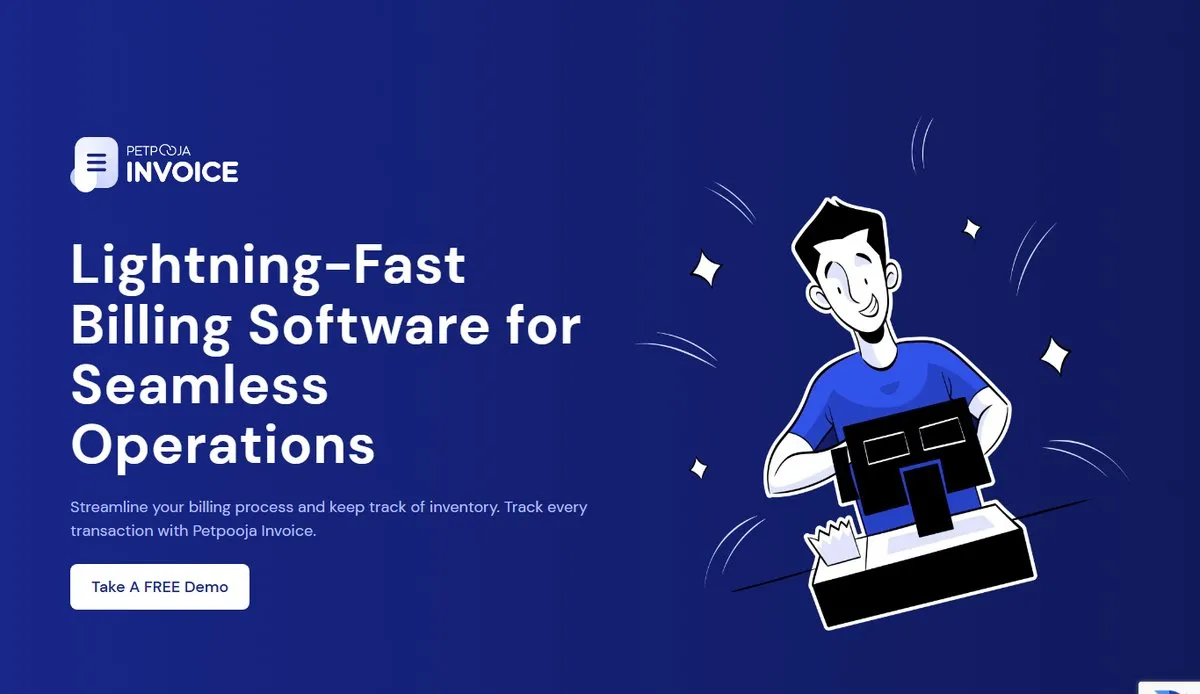 The Petpooja Invoice product page (screenshot, 23 October 2026).
What users say: Petpooja Invoice is new on G2 and has no reviews there yet. Petpooja’s restaurant POS, from the same company, is rated 4.7 out of 5 from 289 reviews on G2.
Pros:
- E-invoices and e-way bills from the same billing screen
- B2B and walk-in bills on one counter
- GSTR-1, GSTR-2 and GSTR-3B reports for your accountant
- Tally integration, so your accountant does not retype bills
- Billing on several counters, with several users
- Real-time stock tracking
Cons:
- It is a relatively new platform, though it comes from Petpooja, a brand that has built software for Indian businesses for 14+ years.
Ask in the demo which plan includes e-invoicing. Our Petpooja Invoice features guide covers the rest.
2. TallyPrime
Best for: Businesses whose accounts already sit in TallyPrime, such as a garment manufacturer in Tiruppur (an example).
If your accountant already keeps your books in TallyPrime, e-invoicing can start there. Tally’s e-invoicing page says you can generate an e-invoice with “a valid IRN and QR code in a single click”. It also lists bulk e-invoices, e-way bills alongside them, and cancelling an e-invoice within 24 hours.
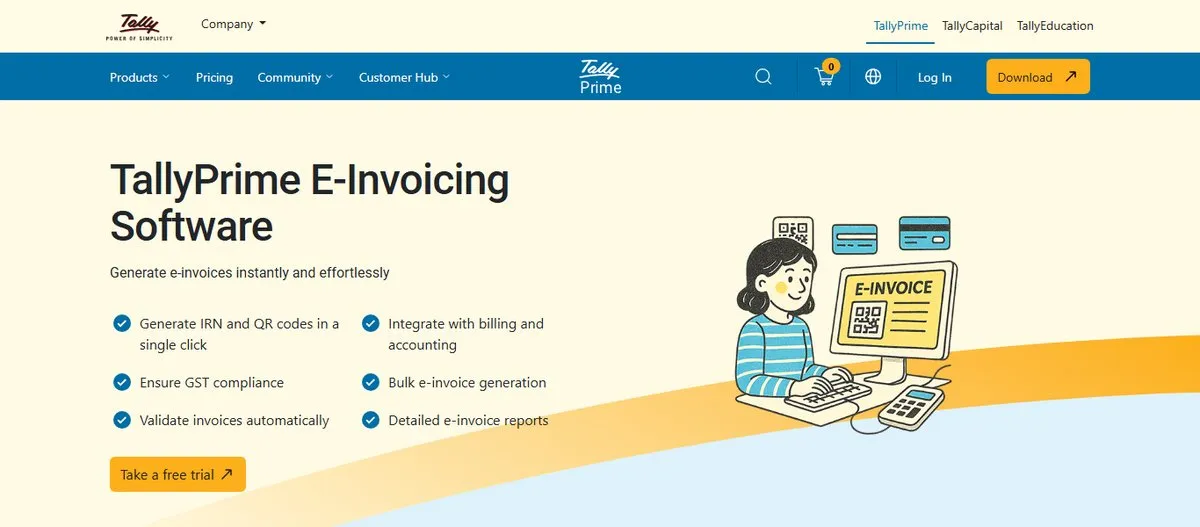 TallyPrime’s e-invoicing page (screenshot, 23 October 2026).
What users say: TallyPrime is rated 4.4 out of 5 from 306 reviews on G2. One small-business reviewer wrote: “It’s easy to learn because it follows the way normal accounts work, and it takes care of GST, e-invoices and e-way bills without much trouble.”
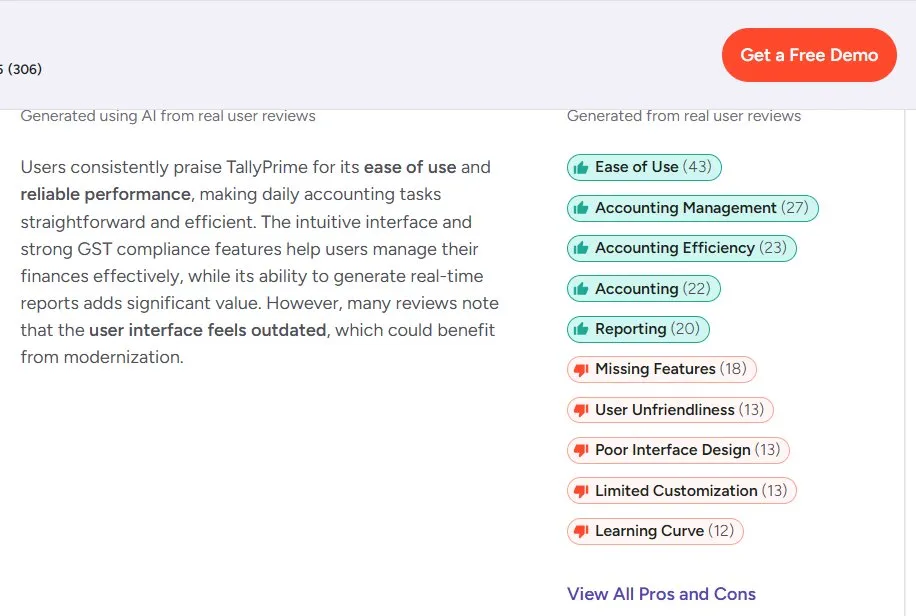 TallyPrime on G2: 4.4 out of 5 from 306 reviews, with the pros and cons G2 draws from user reviews (screenshot, 23 October 2026).
Pros: Ease of use, accounting management, accounting efficiency and reporting.
Cons: Missing features, a learning curve, and an interface some reviewers find hard to use.
3. Zoho Books
Best for: Firms with branches in more than one state, each with its own GST number.
Zoho says it is approved to connect directly to GST systems. Zoho Books’ e-invoicing page says this lets you upload invoices to the IRP from inside Zoho Books. The page also lists checks on your data before upload, recurring e-invoices, and tracking across more than one GST number.
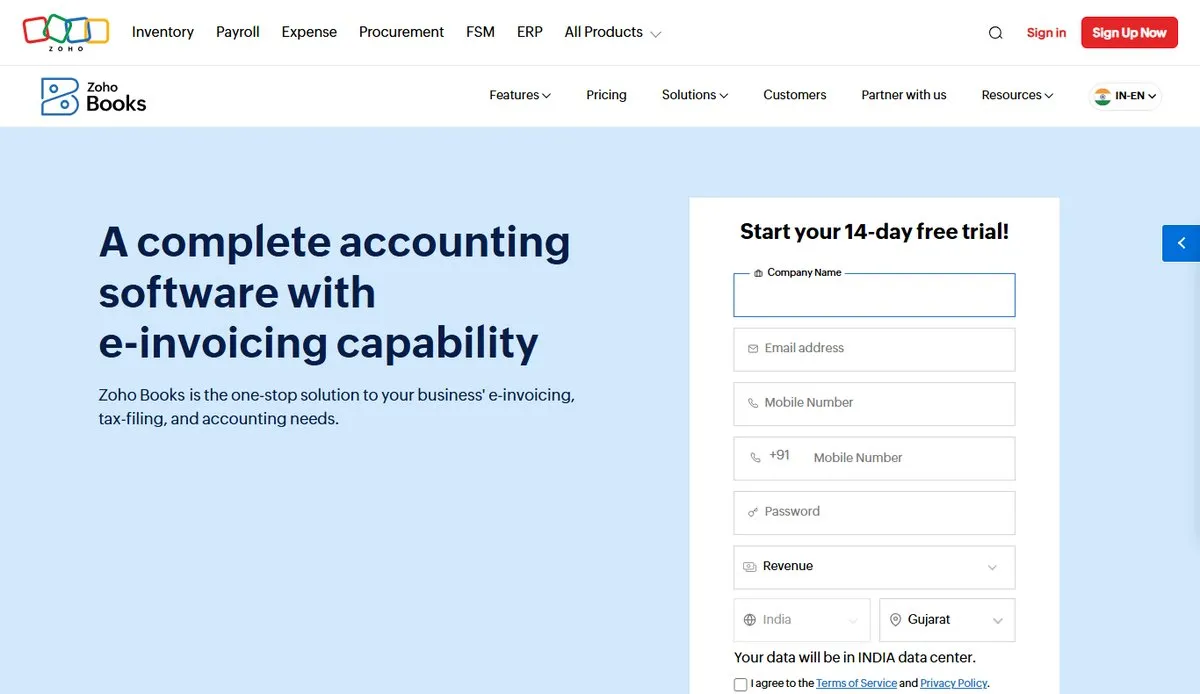 Zoho Books’ e-invoicing page (screenshot, 23 October 2026).
What users say: Zoho Books is rated 4.4 out of 5 from 330 reviews on G2. A senior accounts executive at a small business praised its invoicing, GST compliance and automated reminders.
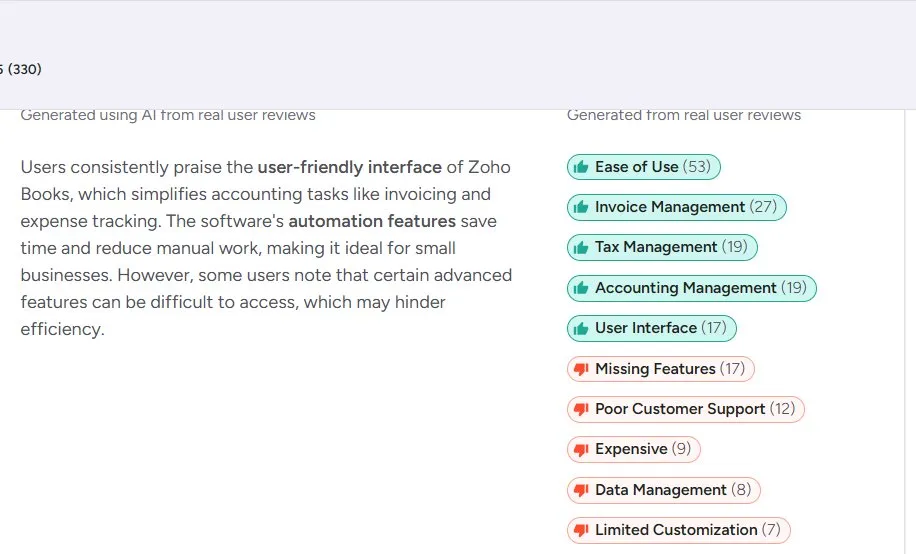 Zoho Books on G2: 4.4 out of 5 from 330 reviews, with the pros and cons G2 draws from user reviews (screenshot, 23 October 2026).
Pros: Ease of use, invoice management, tax management and accounting management.
Cons: Missing features, customer support and price, which some reviewers call expensive.
4. BUSY
Best for: Distributors who raise many B2B bills in a day, such as a pharma distributor in Bhiwandi (an example).
BUSY’s e-invoice page says it sends invoice details to the IRP straight from BUSY, so you do not log in to the IRP yourself. It says it returns the IRN and a signed QR code, and can generate IRNs “for multiple vouchers in one action”.
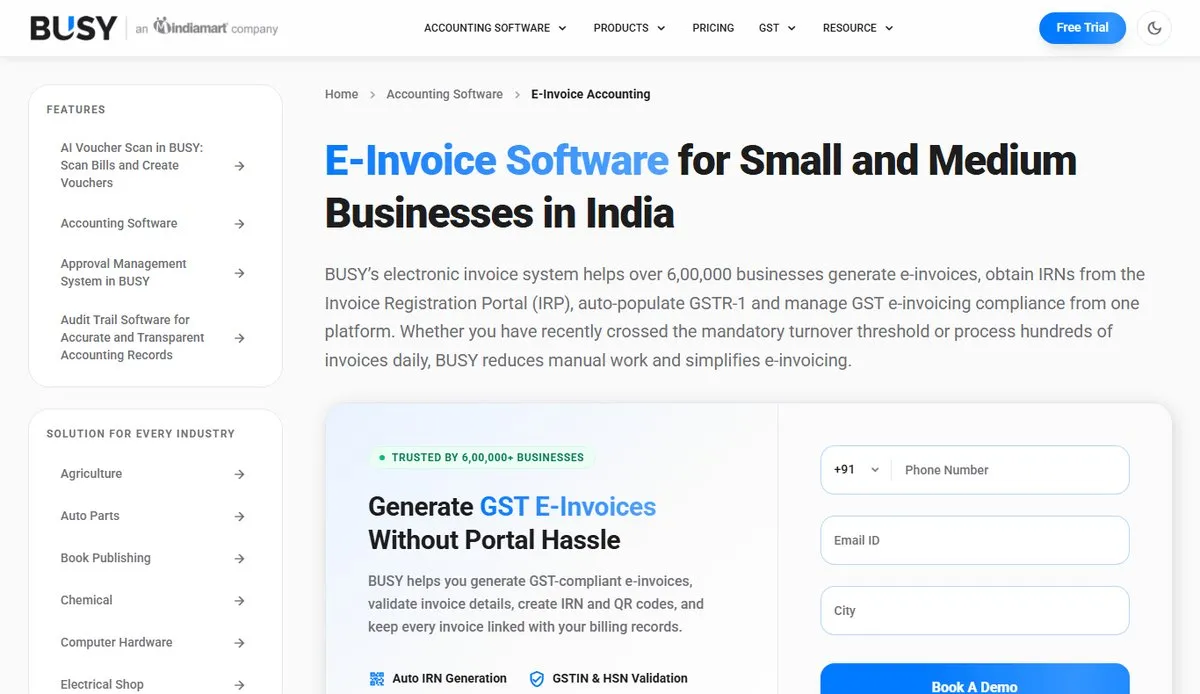 BUSY’s e-invoice page (screenshot, 23 October 2026).
What users say: BUSY is rated 4.4 out of 5 from 41 reviews on G2. A support manager at a small business wrote that it “cuts down on manual work and errors, saves us time”.
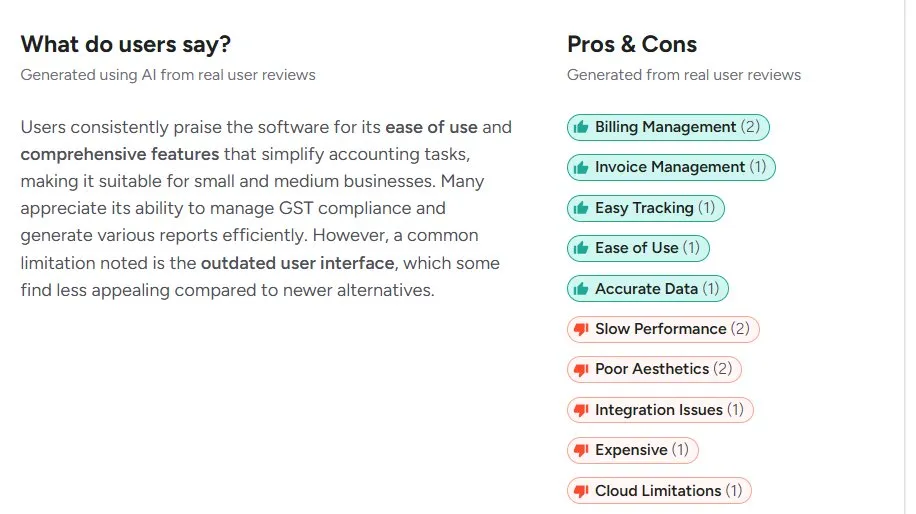 BUSY on G2: rated 4.4 out of 5 from 41 reviews. The pros and cons G2 draws from user reviews (screenshot, 23 October 2026).
Pros: Billing management, invoice management, easy tracking and ease of use.
Cons: Slow performance, the look of the screens, and integration issues. Each of these comes from only one or two G2 reviews, so treat them as early signals.
5. Vyapar
Best for: Shop owners who want billing on a phone as well as a computer.
Vyapar describes itself as GST billing, accounting and stock software for small business owners. Its site says you can “Generate GST-compliant e-invoices and create e-way bills instantly”, and it lists apps for Android, iOS, Windows and Mac.
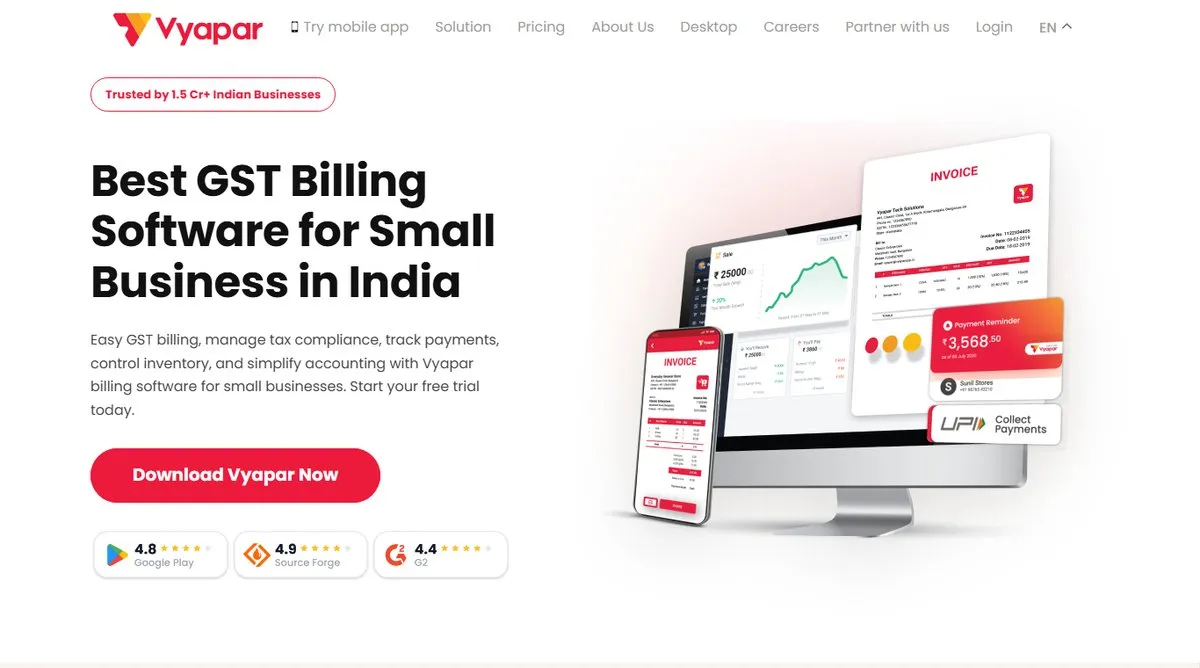 Vyapar’s homepage (screenshot, 23 October 2026).
What users say: Vyapar is rated 4.4 out of 5 from 63 reviews on G2. One reviewer from a small business wrote: “While creating a bill, it automatically calculates GST… It is very easy to create an e-invoice”.
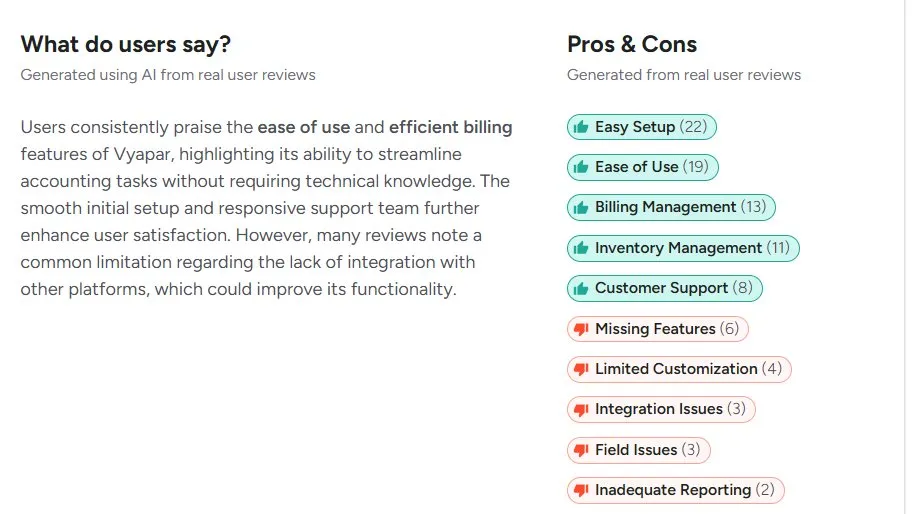 Vyapar on G2: rated 4.4 out of 5 from 63 reviews. The pros and cons G2 draws from user reviews (screenshot, 23 October 2026).
Pros: Easy setup, ease of use, billing management and inventory management.
Cons: Missing features, limited customisation and integration issues.
We set Vyapar and our own tool side by side in Petpooja Invoice vs Vyapar.
All five tools say they get the IRN for you. What matters next is which jobs that software must do on your counter.
What to Look for in E-Invoice Software
Good e-invoice software does six jobs, starting with the IRN itself. This section lists them, so you can check each of the five tools above against your own shop.
| What to Check in E-Invoice Software | Why It Matters for Shop Owners |
|---|---|
| IRN from the billing screen | No second login and no typing the bill twice |
| B2B and walk-in bills on one counter | Only B2B bills need an IRN, so the software must tell them apart |
| Credit notes and debit notes | Returns and price changes need an IRN too |
| E-way bill from the same data | Goods on the move may need an e-way bill too |
| Flow into GSTR-1 and your accounts | Fewer mismatches when you file returns |
| More than one GST number or branch | Turnover counts across your whole PAN |
Credit notes are easy to overlook. Say a buyer in Surat sends back goods worth ₹18,640 in January 2027 (an example). The credit note for that return needs its own IRN, just like the first bill.
Use the table as a checklist during each demo. Ask the vendor to show each row on a live bill, not on a slide.
Do Small Indian Business Owners Need E-Invoice Software?
You need e-invoicing once your turnover has been more than ₹5 crore in any year since 2017-18. Software is not legally required, but it saves you from typing each B2B bill twice. This section covers who must e-invoice, which bills need an IRN, and the time limit for larger firms.
Who Must E-Invoice
The limit has been five crore rupees since 1 August 2023, under Notification 10/2023-Central Tax. It was ten crore before that.
The turnover counts every GST number under your Permanent Account Number (PAN), across India. The limit is checked against any year from 2017-18 onwards, as the Goods and Services Tax Network (GSTN) e-invoice handbook explains. So one good year is enough to bring you in.
Take a hosiery wholesaler in Kanpur (an example). Turnover was ₹4.6 crore in 2024-25 and ₹5.3 crore in 2025-26. The second year crossed the limit, so e-invoicing applies from 1 April 2026.
Some sectors are left out. An exemption note on the IRIS IRP, one of the government-authorised portals, lists them. They include banks, insurers and other financial firms, and goods transport agencies. Passenger transport, cinema tickets and units in a Special Economic Zone (SEZ) are also on the list.
Which Bills Need an IRN
Only B2B bills and a few related documents need an IRN. The GSTN handbook lists invoices, credit notes and debit notes for B2B sales, sales to SEZs, exports and deemed exports.
A sale to a walk-in customer does not need one. That matters for shop owners who sell to both walk-in and business buyers, because the software has to tell the two apart.
Tax invoice Seller and buyer details Items, rates and GST Invoice number and date Added by the IRP: Invoice Reference Number (IRN) Signed QR code What your software fills in, and what the IRP adds, on a GST e-invoice.Your software fills in the seller and buyer details, the items, rates and GST, and the invoice number and date. The IRP adds the Invoice Reference Number and a signed QR code. A copy then flows into your GSTR-1 sales return, as the GSTN handbook describes.
The 30-Day Limit at ₹10 Crore and Above
Larger firms also face a deadline. From 1 April 2025, a business with turnover of ₹10 crore or more has 30 days to report each e-invoice. That is the rule in the GSTN time-limit advisory.
The advisory gives its own example. An invoice dated 1 April 2025 could not be reported after 30 April 2025. The rule covers invoices, credit notes and debit notes. Below ₹10 crore, there is no such limit “as of now”, in the advisory’s words.
Say a pump maker in Coimbatore has ₹11.4 crore turnover (an example). If it bills a buyer on 3 November 2026, it has until 2 December 2026. After that, the IRP will not accept it.
This is where software earns its fee. A bill that gets its IRN when it is printed is far less likely to miss the window.
Can You Get an E-Invoice IRN Without Software?
You can get an IRN without paid software, using the free tools on the IRPs. Six IRPs are authorised to issue IRNs, and the GSTN handbook says reporting on them is “free of charge”. This section covers who runs them and the steps to follow.
The six are run by five organisations, as listed in a Maharashtra GST notice. The National Informatics Centre (NIC) runs two. Cygnet, ClearTax, EY and IRIS run one each.
Here is how it works:
- Register on one IRP, such as the NIC e-invoice registration page, with an OTP sent to the mobile number and email registered on your GST account.
- Make the bill in your own billing system first. The IRP does not create the bill for you.
- Enter the bill on the IRP’s web form, or prepare a file in its offline tool. The NIC e-invoice user manual shows each screen.
- Download the signed e-invoice with its IRN and QR code, and send it to the buyer.
The NIC portal offers Excel tools for bulk upload. The catch is the double entry. Every bill has to be entered again on the portal, by hand or through an upload file.
So the free tools fit best when you raise very few B2B bills. For a shop with regular B2B sales, software that requests the IRN itself saves that double entry.
Which E-Invoice Software Fits Your Shop?
The right e-invoice software depends on your B2B bill volume, where your accounts already live and your turnover. Use these situations to find yours.
- A handful of B2B bills a month. A stationery wholesaler in Lucknow raising 14 such bills (an example) may manage with the free IRP tools. Someone still has to enter each bill twice. Shops still on paper can start with our manual billing vs POS comparison.
- A busy retail counter with some business buyers. Choose billing software that handles walk-in and B2B bills on one screen. A tile showroom in Jaipur selling to both homeowners and builders fits here (an example). Our retail billing software roundup compares counter billing in more depth.
- Books already in an accounting package. Check whether that package can request the IRN itself before buying anything new.
- Turnover of ₹10 crore or more. The 30-day limit applies, so the IRN should come at the moment of billing, not at the end of the month.
- Branches in several states. Make sure the software handles a separate GST number for each one.
What I could recommend from my end. If you bill at a retail counter and also sell to businesses, I recommend Petpooja Invoice. It makes e-invoices and e-way bills from the same billing screen as your walk-in bills. Book a free demo and ask to see a B2B bill get its IRN, then a credit note against it.
A software choice made this way fits the shop you run today. It also leaves room for the day your turnover crosses ₹10 crore.
Conclusion
For most small Indian businesses, the best e-invoice software is the one that gets the IRN when the bill is made. You type each bill once, and at ₹10 crore or more, no bill sits unreported until the 30-day limit runs out.
Start by counting your B2B bills for one month. With your turnover, that number tells you whether the free IRP tools will do, or whether you need software.
Then shortlist two or three options, and ask each to show a credit note and an e-way bill on a live demo. For Indian retailers who also sell to businesses, Petpooja Invoice lists e-invoices, e-way bills and GST billing among its features. Ask to see all three on one counter in the demo.
Frequently Asked Questions
What Happens If I Send a B2B Bill Without an IRN?
Once e-invoicing applies to you, a B2B bill without an IRN does not count as a valid invoice. Rule 48(5) of the CGST Rules says so. The GSTN handbook mentioned earlier says the same: a B2B invoice is valid only with a valid IRN. So report every B2B bill.
Is an E-Invoice the Same as an E-Way Bill?
No. The e-way bill is a separate document for moving goods. NIC’s tools let you create an e-way bill from an IRN, so you do not enter the details again.
How Can My Buyer Check That My E-Invoice Is Genuine?
They can scan the QR code with the GSTN e-Invoice QR Code Verifier app. They can also search the IRN on the GST e-invoice portal.
Can a Small Retailer Below ₹5 Crore Use E-Invoice Software Anyway?
Yes. You can bill on software that supports e-invoicing before you need it, and switch on the e-invoice part when the rule starts to apply to you. Our guide to retail billing software prices shows what affects the cost.
Thanks. This helps us make the next article better.

Nisarg Kansara is Senior Marketing Manager at Petpooja. What he brings to table is the tactical layer, meaning the features most users never find, the automations that remove a daily chore, and the exact fix for a workflow that keeps breaking. He spends his weeks with Indian business owners working out where billing, purchase entries and task follow-ups fall apart in practice, and that input shapes how the products change. India has over 1.5 crore active GST registrations, and most of those businesses still handle compliance by hand. Nisarg writes for the owners trying to change that, with a focus on where AI removes manual work rather than adding another button.