
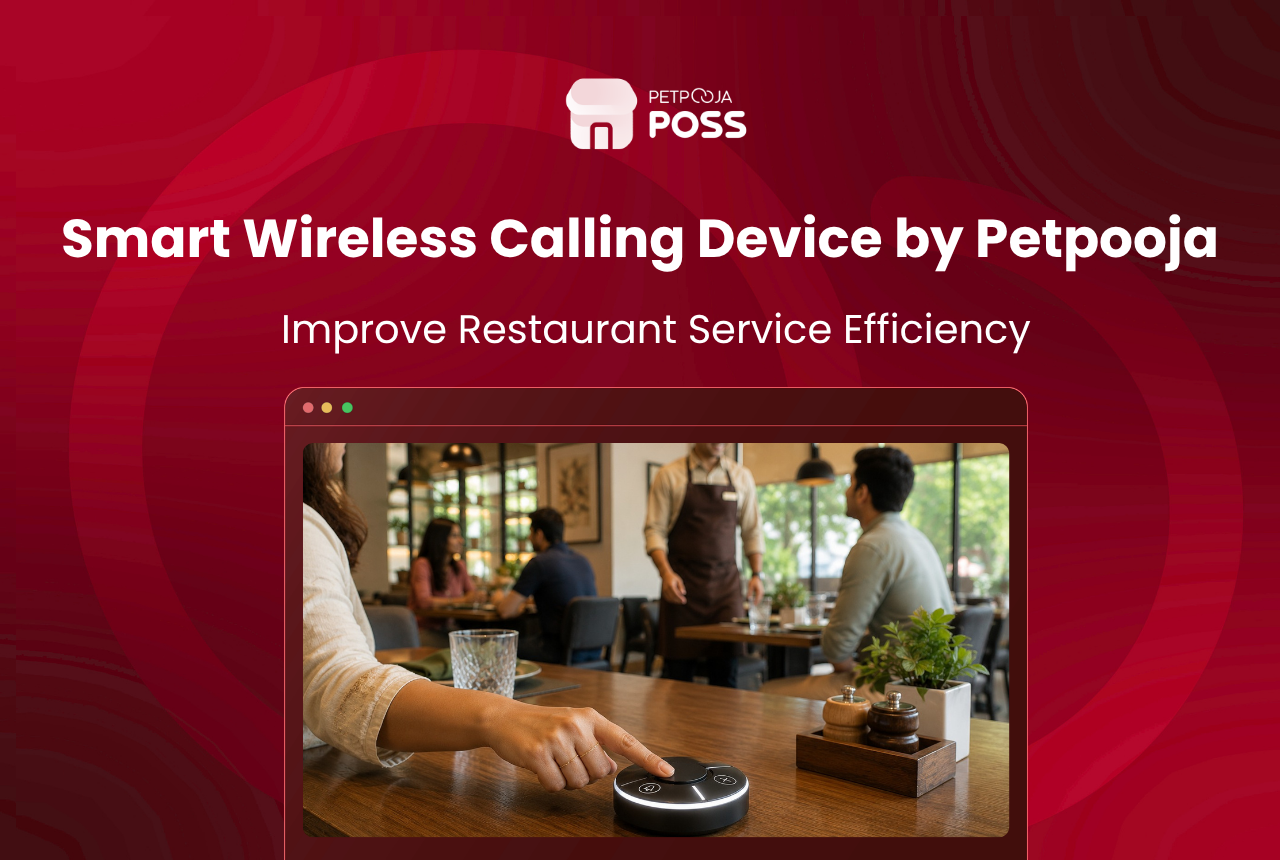
Petpooja’s Wireless Calling Device (WCD) is a small, rechargeable tabletop unit with four colour-coded buttons: Water, Waiter, Bill, and Cancel. A guest taps one button, and the request shows up on your Petpooja POSS billing screen, Captain App tablet, and Android TV display within seconds. No shouting, no hand-waving, no guessing which table needs attention.
The unit runs on your existing outlet Wi-Fi, lasts 15 to 20 days on a single charge, covers a 20-metre line-of-sight range, and comes with an anti-theft adhesive mount. Setup takes minutes because it pairs directly with your Petpooja account.
Key Takeaways
- Four buttons per table: Water, Waiter, Bill, Cancel. Each sends a tagged alert to your POS, Captain App, and Android TV
- Runs on Wi-Fi with no separate receiver hardware, no SIM card, and no internet dependency
- 15 to 20-day battery life on a single charge, with a 20-metre line-of-sight range
- Anti-theft adhesive mount with tamper-resistant release key, so the unit stays on the table
- Plug-and-play pairing with your Petpooja account; no technician visit needed
- Button labels can be customised per outlet type through the Petpooja sales team
For a detailed look at how each button works, where alerts land, and how this device affects your revenue, read our full breakdown on how the Wireless Calling Device drives business growth.
Why Do Indian Restaurants Need a Wireless Calling Device?
India’s food services sector employed 85.5 lakh people in 2024, and that number is expected to grow by over 20% by 2028, according to the NRAI India Food Services Report. With dine-in accounting for 59.49% of the total foodservice market as of 2025, the floor experience carries weight that delivery apps simply cannot replace. A KPMG India CX Report found that only 42% of QSR customers feel satisfied with the brand they visit frequently, and slow service ranks among the top three reasons guests do not return.
How many minutes does your average guest wait before someone notices them? In most Indian restaurants, the cycle has not changed in decades. A guest wants water, so they scan the room for a free server. If no one is looking their way, the options narrow to a raised hand, a snap, a shout of “Bhaiya!”, or a loud clap. None of these work well during a packed Saturday-night service at a 60-cover restaurant in Andheri or a 40-table banquet hall in Vastrapur. And even the best restaurant table layout cannot fix a communication gap between guests and the floor team.
At Petpooja, we have seen this pattern across 1,00,000+ restaurants: the louder a floor gets, the slower the service feels to the guest, even if your crew is actually moving faster. A wireless calling unit breaks that loop by replacing noise with a silent, tracked signal.
What Are the Technical Specs?
A wireless calling device is a tabletop transmitter that lets seated guests send tagged service requests to staff screens without speaking, waving, or leaving their seat. India’s cafe and restaurant market is projected to grow at 8.33% CAGR through 2029, and much of that growth ties back to digital tools that remove friction from the service cycle. Here is what the Petpooja WCD offers on paper.
| Spec | Detail |
|---|---|
| Connectivity | Wi-Fi (connects to existing outlet Wi-Fi, no separate receiver or SIM needed) |
| Internet requirement | None; operates without active internet |
| Battery | Rechargeable, 15 to 20 days on a single charge |
| Range | 20-metre line-of-sight |
| Mounting | Adhesive mount with tamper-resistant release key |
| Setup | Plug-and-play: pair with Petpooja account, no technician visit |
| Button count | 4 (Water, Waiter, Bill, Cancel) |
| Integration | Petpooja POSS, Captain App, Android TV |
The 20-metre range covers most dining floors comfortably, but outdoor patios or rooftop sections beyond that distance may need a Wi-Fi extender. For context, a standard 2,500 sq ft restaurant floor in Madhapur, Hyderabad or Aundh, Pune falls well within range. Chains like La Pino’z Pizza, which use Captain App across hundreds of outlets, can plug the WCD into the same workflow without any migration.
How Do You Set It Up?
Three steps and you are done. No technician visit, no wiring, no separate software. Across early-adopter outlets, the average setup from unboxing to first live ping took under 5 minutes.
- Stick the adhesive mount on the table surface. The tamper-resistant key means a guest cannot pull the unit off without the release tool, but your crew can reposition it when needed.
- Power on the unit and connect it to your outlet’s Wi-Fi network. Because there is no separate receiver box to install, you skip the hardware mounting step entirely.
- Pair the unit with your Petpooja account. Notifications start flowing to your POSS, Captain App, and Android TV within seconds. If you are running the March 2026 or later build of Petpooja POSS, the pairing option sits right inside the settings menu.
One thing to budget for: if you run 30 tables, you need 30 units. A 45-table family restaurant in Maninagar, Ahmedabad ordered 45 units at roughly ₹47,400 for the full lot. The per-unit cost drops as your table count rises, so ask the sales team for a quote specific to your outlet size.
How Does a Wireless Calling Device Compare to Other Methods?
Most Indian restaurants still rely on one of three older approaches: a metal bell on the table, a hand-raise-and-wait system, or QR code ordering via a guest’s phone. Here is how the WCD stacks up.
| Method | Response Time | Works Offline | Staff Knows Request Type | Guest Effort | Setup Cost |
|---|---|---|---|---|---|
| Shouting or hand-waving | Slow (depends on eye contact) | Yes | No | High | Free |
| Metal bell on table | Medium (audible but not targeted) | Yes | No | Low | Low |
| QR code ordering on guest’s phone | Fast (digital) | No (needs internet) | Yes | Medium (requires smartphone) | Low-Medium |
| Petpooja WCD | Fast (instant tagged alert) | Yes (Wi-Fi, no internet) | Yes (4 tagged buttons) | Low (single tap) | Paid add-on |
The Petpooja option sits in a middle ground: it gives you the digital precision of QR ordering without requiring guests to pull out their phones, and it removes the noise of traditional bell or shout-based systems.
What Should You Check Before Buying Any Table Buzzer?
If you are evaluating wireless calling devices for the first time, whether from Petpooja or another vendor, there are a few things worth verifying before you place an order. We have seen outlets in Bopal, Ahmedabad and Electronic City, Bangalore run into avoidable issues simply because they skipped these checks.
Wi-Fi coverage across the full dining area. The WCD connects to your router, so dead zones matter. Walk the floor with your phone and check signal strength at the farthest table. A 2,500 sq ft restaurant in Madhapur, Hyderabad found that their router, tucked behind the billing counter, could not reach the outdoor patio 18 metres away. Moving the router to a central ceiling mount fixed it before the devices even arrived.
Table surface compatibility. The adhesive mount sticks to wood, laminate, glass, and most stone surfaces. Textured or uneven granite tops may need a flat acrylic pad underneath. If your tables have tablecloths that change daily, the mount goes on the table itself, not the cloth.
Staff training on the alert flow. The hardware is plug-and-play, but your team needs to know where to look. At Petpooja, we run a 15-minute onboarding walkthrough during the first day of setup: which screen shows what, how to mark a ticket as attended, and when to use the mute option. Outlets that skip this step end up with captains ignoring alerts for the first week because they did not realise the notification was for them.
Number of units per floor. One unit per table is the standard, but banquet halls that rearrange seating for events sometimes need a few spares. A 200-cover banquet space in Salt Lake, Kolkata ordered 30 units for 25 regular tables plus 5 extras for overflow seating during weekend weddings.
Charging schedule. With a 15 to 20-day battery, you do not need to charge often, but you do need a system. The simplest approach: pick one slow weekday, pull all units off tables after closing, charge overnight, and put them back the next morning. A Tuesday-night charge cycle works for most outlets.
How Does It Fit with the Rest of Petpooja POSS?
The WCD is one of several add-ons that plug into the same Petpooja POSS ecosystem. Because every request tag carries a table number, it ties neatly into features you might already use: table-wise billing, captain-wise order assignment, and the POS-driven operations workflow that tracks which table ordered what and when.
If you are already using Petpooja add-ons like token management or the kitchen display system, the calling hardware slots in without a separate login or additional software. It is the same dashboard, the same Captain App, and the same billing screen you already know. A multi-outlet chain running 4 branches in Surat, for example, can manage all devices from the same admin login while keeping each branch’s request tags separate.
The unit is available as a paid add-on to your Petpooja POSS subscription. For pricing and availability in your city, reach out to the sales team.
Conclusion
Petpooja’s Wireless Calling Device puts four tap points on each table and routes every guest request to your POSS, Captain App, and Android TV in real time. It runs on Wi-Fi, charges once every 15 to 20 days, mounts without drilling, and pairs with your existing Petpooja account in minutes. For restaurants where floor noise, slow water refills, or delayed bill delivery eat into the guest experience, this is a targeted fix that does not require overhauling your existing setup.
To see how the device affects table turns, staff efficiency, and revenue, read the business growth walkthrough linked after the Key Takeaways above. To get the unit for your outlet, reach out to the Petpooja sales team at support@petpooja.com.
FAQs
No. The unit connects to your outlet’s Wi-Fi network but does not need active internet to send alerts. It communicates locally within the same network, so even if your broadband drops for a few minutes during a dinner rush, the buttons keep working.
Yes, it pairs directly with your Petpooja account and sends alerts to POSS, Captain App, and Android TV. No new software installation, no separate login, and no technician visit. You set it up yourself in a few minutes.
Most buzzer kits sold on Amazon or Alibaba need a separate receiver box, a dedicated SIM, or proprietary hardware bolted to your wall. The Petpooja WCD skips all of that by running on your existing Wi-Fi and feeding alerts directly into your POSS, Captain App, and Android TV, so every request is tracked and tagged by table number.
Yes. Each unit pairs with a specific outlet under your Petpooja account, so a chain running 4 branches in Surat can manage all devices from the same admin login. Alerts stay local to each outlet, and the settings menu lets you configure button labels per branch.
The WCD has a 20-metre line-of-sight range from the router. If your router sits behind the billing counter and your farthest table is beyond 18 metres, consider relocating the router to a central ceiling point or adding a Wi-Fi extender. Test signal strength at the farthest table before mounting the devices.








