
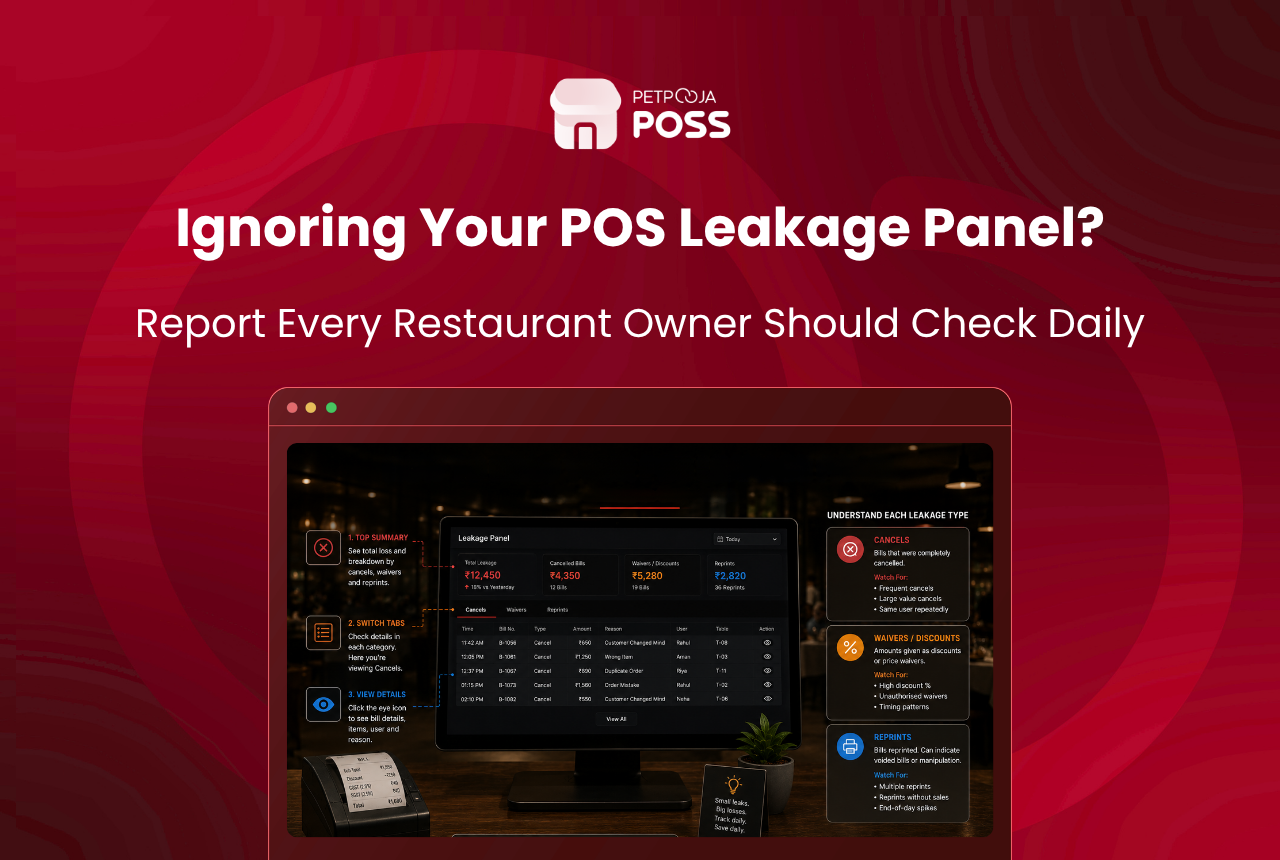
Your POS Leakage panel is one screen that gathers the 3 actions most tied to lost revenue: cancelled and modified KOTs, waived and modified bills, and reprints. Each one is logged against the biller who did it. Reading it well is about spotting a pattern, not punishing a single cancel.
Most of what shows up here is honest. A guest changes their order, the kitchen runs out of prawns, a biller fixes a wrong table. The signal you want is the repeat: the same biller, the same reason, the same late hour, over and over.
This guide walks through what each of the 3 signals means, how to tell a genuine mistake from a red flag, and what to do when a pattern appears. Petpooja POSS puts all of this in the Leakage panel, so you read reports instead of chasing hunches.
Key Takeaways
- The Leakage panel tracks 3 signals: cancelled or modified KOTs, waived or modified bills, and reprints
- Every action is stamped with the biller’s name, so you read patterns by person and table
- A single cancel is not fraud; the same biller repeating it after cash sales is the flag
- Preset cancellation reasons turn a vague “cancelled” into a checkable record
- User rights keep risky actions, like cancelling a settled bill, with a supervisor
What Is the Leakage Panel in a Restaurant POS?
The Leakage panel is a single view that pulls together the actions most linked to fraud or shrinkage. Instead of reading thousands of raw bills, an owner sees cancelled and modified KOTs, bills that were waived or reprinted, and orders moved between tables, all in one place.
Its real value is the name attached to each line. Because every action is logged against a biller, the panel answers a sharper question than “what happened”. It answers “who did this, how often, and when”. That is what turns a pile of data into something you can act on.
It differs from a standard sales report in one way that matters. A sales report tells you what you earned. The Leakage panel tells you what you might have lost and points at where to look. One is a scoreboard, the other is a smoke alarm, and the owners who watch neither are the ones who lose profit without noticing.
The panel groups the signals into 3 types. Here is what each one covers before we read them in detail.
What Do Cancelled and Modified KOTs Tell You?
A cancelled KOT means food was ordered, and often made, but the item was pulled from the bill. A modified KOT means items were changed or moved to another table after the ticket was fired. Both are normal dozens of times a day, so the count alone tells you little.
The reason is what gives a cancel meaning. Petpooja POSS lets billers pick from up to 4 preset cancellation reasons, and the reason can print on the KOT so the kitchen sees why an item was pulled in real time. A cancel tagged “guest changed order” reads very differently from a blank one.
Volume matters less than you might think. A high-turnover QSR in Andheri, Mumbai will cancel far more KOTs than a 40-cover fine-dine room, and both can be perfectly clean. What you compare is a biller against their own peers on the same shift, never against a fixed number.
Modifications carry the same logic. Every KOT change is logged item-wise, table-wise, and KOT-wise, and it feeds both the Leakage panel and a dedicated KOT modification report. So when items keep shifting off one table late in the shift, you can see exactly what moved and who moved it. That traceability is what makes employee theft hard to hide.
What Do Waived Bills and Reprints Signal?
A waived bill is one written off, in full or part, and a comp is a free item. Both are fair when the owner approves them. The concern is the quiet giveaway: a regular who never pays, or a “friends” discount that appears on the same table every week.
Reprints are the subtler signal. Printing a bill twice is harmless by itself. The risk is the old trick of handing one copy to the guest, keeping the cash, then cancelling or editing the sale after they leave. The Order Print Count Report shows how many times each bill was reprinted, so an unusual count on one till stands out.
Bills edited after printing get their own watch too. The After Print Modification report tracks any bill changed once it was printed, which is why it is built as an anti-theft check. A complimentary-order report adds the last piece, listing every free item with its order number and reason, so comps are never invisible. Read the waivers, reprints, comps, and post-print edits together, and a single biller quietly shrinking recorded sales becomes visible.
How Do You Tell Normal Activity From a Red Flag?
The honest answer is that no single line proves anything. Fraud shows up as a pattern across time, biller, and reason, not as one dramatic entry. Use the table below as a rough guide when you scan the panel.
| Signal on the panel | Usually fine | Worth a closer look |
|---|---|---|
| Cancelled KOT | Clear preset reason, spread across billers | No reason, or same reason repeating from one biller |
| Waived bill or comp | Approved offer, matches a manager note | Same table or guest, no approval, off-peak hours |
| Reprint | 1 or 2 on a busy table | High reprint count on one till near closing |
| Post-settlement edit | Rare, with a logged reason | Repeated edits that lower the total after cash sales |
The thread running through the red-flag column is repetition tied to one person and to cash. A busy Saturday dinner service will always throw up cancels and reprints. What it should not throw up is the same biller cancelling ₹380 orders near the 11pm close, week after week.
Studies of workplace fraud back this up. The Association of Certified Fraud Examiners, which researches internal fraud worldwide, finds these schemes usually run for months before anyone notices, precisely because each act looks minor on its own. The panel exists to shorten that gap from months to a single week.
What Should You Do When You Spot a Pattern?
Start with the reason, not the person. Open the flagged entries and read the logged reason against what the panel shows. A run of blank cancels or mismatched comps is a conversation to have before it is an accusation to make.
Most patterns have a dull explanation. A new biller who was never shown the reason dropdown will leave a trail of blank cancels that looks alarming and means nothing worse than poor training. Rule those out first, and the entries that remain are the ones worth real attention.
Then tighten the controls so the gap closes on its own. Turn on preset cancellation and complimentary reasons so no action is reasonless, and use user rights to decide who may cancel a settled bill or issue a refund. In Petpooja POSS, a biller without “After Settlement Modification” rights cannot cancel a settled bill or change its total at all.
Under it all sits an audit trail that stamps every change with a user, a time, and the terminal it came from. You can see the full Petpooja POSS controls inside User Management.
For a lasting habit, fold a weekly panel scan into your opening and closing checklist so it lands on a set day rather than after a bad month. Five minutes on a fixed morning beats an hour of digging when the numbers finally look wrong.
Here is an illustration, not a real client. A casual-dining outlet in Indiranagar, Bengaluru noticed one biller with 14 cancelled KOTs in a week, all tagged “wrong entry” and all after 10pm. The Leakage panel showed the same till and the same late window. The fix was not a camera. It was removing that biller’s cancel right and moving it to the floor manager, and the count dropped to near zero the next week.
Conclusion
The Leakage panel does not accuse anyone. It simply records the 3 actions where restaurant money quietly leaks out, cancelled KOTs, waived bills, and reprints, and it stamps each with a name and a time. Your job is to read the pattern, not the one-off.
Do that for 5 minutes a week, tighten the reasons and rights behind the risky actions, and most casual leakage stops paying off. Petpooja POSS builds the panel, the reports, and the controls into one system across 1,00,000+ restaurants. To see how it reads on your own outlet, book a demo.
Frequently Asked Questions
It is a single screen that gathers the actions most linked to lost revenue: cancelled, modified, unbilled, or moved KOTs, and bills that were modified, reprinted, or waived. Each line is logged against the biller who did it, so you scan for patterns instead of reading raw sales. It sits alongside the standard daily sales report as an owner’s control view.
No. Most cancels are genuine, a guest changing their mind or the kitchen running out of an item. That is why the reason matters. A cancel with a clear preset reason is usually fine, while a blank cancel repeated by one biller after cash sales is the pattern worth checking.
A reprint alone is harmless. The risk is printing a bill twice, handing one copy over, and keeping the cash while the sale is later cancelled or edited. The Order Print Count Report tracks reprints per bill, so an unusual count on one till is easy to spot before it adds up.
A weekly 5-minute scan catches most issues while they are small. Look for any biller or table with an odd count of cancels, waivers, or reprints, then read the reason logged. A tool like a profit margin calculator helps you see why even small leaks hurt on a thin margin.
Yes. User rights let you block a biller from cancelling a settled bill or editing an order after settlement unless they hold that right. Sensitive actions stay with a supervisor, and anything that happens carries the name of the person allowed to do it, backed by a full audit log.








