
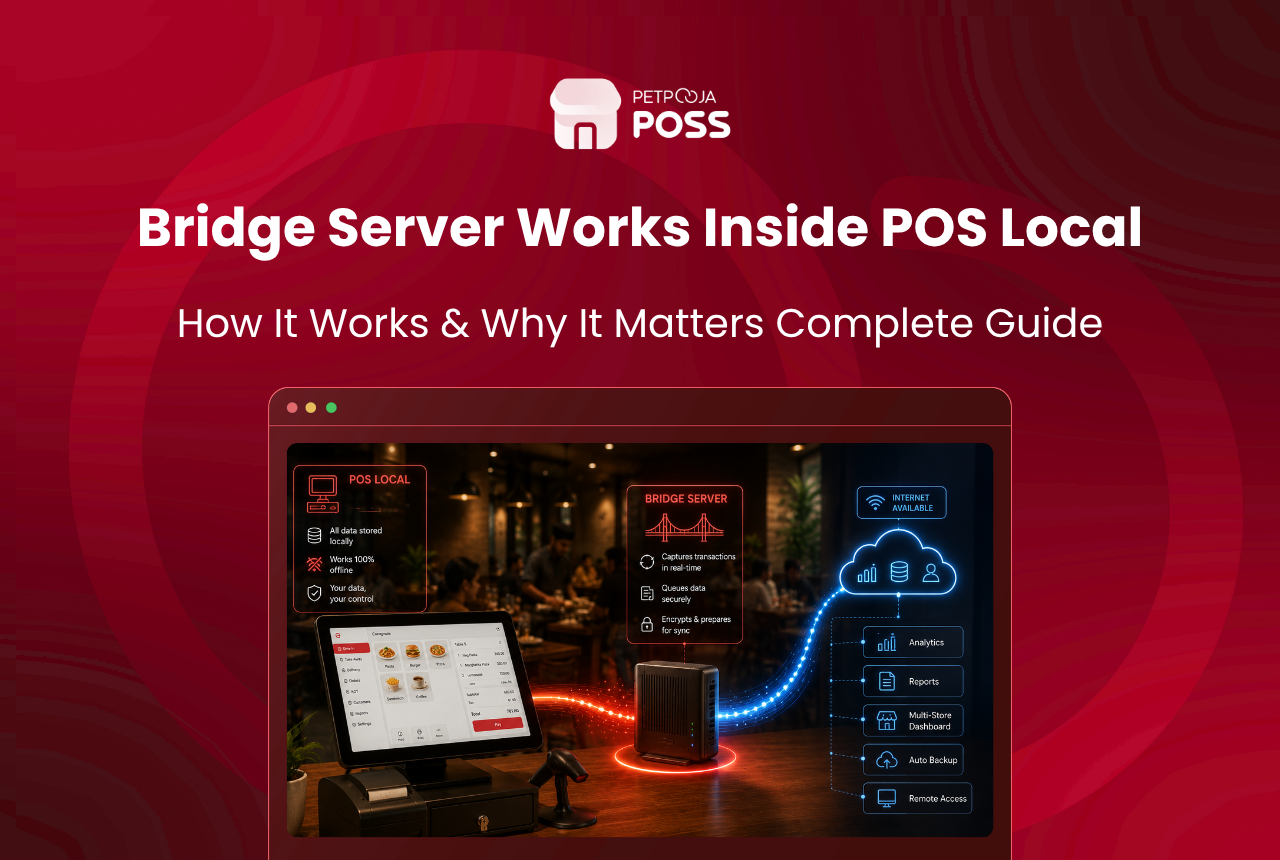
The Bridge Server is the software at the heart of Petpooja POS Local. It runs on a computer at your restaurant and holds the local database where every bill, order and report is saved. Your billing devices connect to it over your own network. So your records stay on site, while your menu and online orders sync down from Petpooja’s cloud.
In plain terms, the Bridge Server is the engine. It is the part that makes POS Local local. Your data lives on that machine rather than on an outside server, and your counters read and write to it directly.
You do not have to set any of this up yourself. The Petpooja team installs and configures it with you. This guide explains what it does under the surface, so you understand where your data sits and how the pieces fit together.
Key Takeaways
- The Bridge Server is the software on a computer at your restaurant that holds your local database.
- Every bill, KOT and report is saved to it, while your menu and online orders sync in from Petpooja’s cloud.
- Your billing terminals, kitchen displays and captain devices all connect to it over your own network.
- It can run on the same computer as your billing screen, or on a separate machine for a busier outlet.
- It backs up your data on a schedule you set, keeping your records on your own hardware.
The Bridge Server sits at your restaurant, holds your local database, and connects your devices, while your menu and online orders sync in from Petpooja’s cloud.
What Is the Bridge Server?
The Bridge Server is the core piece of Petpooja POS Local. It is installed on a dedicated computer at your restaurant, and it manages the local database that stores all your billing data.
A database comes built into it and installs during setup, so you do not need to add anything separately. The software runs on a Windows computer. The Petpooja team handles the install, including the parts that let your devices find and talk to it.
It helps to picture a shop that keeps its ledger on the premises, rather than in a rented office across town. With the Bridge Server, the ledger is in the building. That single fact shapes how POS Local behaves, and it is the reason your data stays in your hands, a point covered in who owns your restaurant’s sales data.
Everything your staff see on screen looks like a normal Petpooja setup: the same billing flow, the same reports. What changes is where each record is written, which is to the machine in your own restaurant, not a data centre elsewhere.
What Does the Bridge Server Keep, and What Syncs In?
The Bridge Server works in both directions at once. It keeps your own trading records on site. It also takes in the parts Petpooja manages centrally, so your menu and online orders stay current.
| What the Bridge Server keeps on site | What syncs in from Petpooja’s cloud |
|---|---|
| Every bill and KOT | Menu and price updates |
| Dine-in and takeaway orders | Online orders from Zomato and Swiggy |
| Sales records and day-end reports | Settings and app changes |
| Customer details you collect |
So the numbers that show how your restaurant is doing sit on your machine. The parts that change from Petpooja’s side come down to the Bridge Server, so nothing goes stale. That includes your live menu and your aggregator orders. This is the same data split explained in the cloud POS vs POS Local guide, seen from the engine’s side.
How Do Your Devices Connect to the Bridge Server?
All your billing devices sit on the same local network as the Bridge Server and connect to it there. A single device acts as the Master Billing Station, and the rest link through it.
| Device | Connects to |
|---|---|
| Master Billing Station | The Bridge Server, over your local network |
| Secondary billing counters | The Master Station |
| Kitchen Display System (KDS) | The Master Station |
| Captain devices | The Master Station |
There are 2 ways to run it:
- On the same computer (small outlet): The Bridge Server and the billing software sit on one machine, so everything runs on that single computer.
- On a separate computer (busier outlet): The Bridge Server runs on its own dedicated machine, and the other devices connect to it across the network.
When it runs on a separate computer, that machine is given a fixed address, called a static IP, so your devices always find it. Your terminals reach it on a set network port, which the Petpooja team configures during setup. The KDS in the kitchen and the captain devices on the floor all point to the same system, so every order lands in the same place.
Do You Have to Manage the Bridge Server Yourself?
No. The technical side is set up and looked after by the Petpooja team, not left on your plate. They install the Bridge Server, connect your devices, and configure the network settings that let everything talk to each other.
Your part is simple, and comes down to 3 things:
- Keep the computer running the Bridge Server switched on and powered during service, since it holds the database your billing reads from.
- Let the software updates install on that machine when they are due.
- Set the backup schedule once, after which the built-in backups run on their own.
Beyond that, the system works quietly in the background while your staff use the same billing screens they always have.
What Happens When the Internet Drops?
Because your data lives on the Bridge Server, billing does not stop when the connection does. How long it keeps running depends on the setup.
When the Bridge Server and the POS run on the same computer, billing carries on fully offline. There is nothing to reach over the internet, since the database is right there on the same machine.
When the Bridge Server sits on a separate computer, billing keeps going for up to 5 days without a connection. Your pending online orders catch up on their own once the line returns. So a patchy connection during a busy Saturday does not freeze your counter. Nobody at the counter has to trigger the sync; it happens on its own when the connection is back.
Any menu or price changes pushed from Petpooja’s side while you were offline come down at the same time. So your setup is back in step, with no catching up to do by hand.
How Are Your Backups Handled?
The Bridge Server comes with built-in backups, so your records stay protected on hardware you own. Here is how the backup works:
- A schedule you set: run backups daily, weekly or monthly, whichever fits how your restaurant works.
- Runs on its own: once set, it saves the copies for you without you lifting a finger.
- Clears old copies: it keeps only your most recent backups and removes older ones, so the drive does not fill up.
- Saved to a separate drive: copies go to a D: or E: drive, not the C: drive the software runs on, so your records stay intact even if the main system is ever reinstalled.
Keeping data on site sits well with the rules too. India’s GST record-keeping rules ask you to hold sales records for years, and having them on your own system means they are always to hand. Its data protection law expects the business holding customer data to look after it, which is simpler when that data sits with you.
Conclusion
The Bridge Server is what makes Petpooja POS Local work the way it does. It runs on a computer at your restaurant and holds the database where your bills and reports are saved. Your billing devices connect to it over your own network. Your menu and online orders sync in from Petpooja’s cloud, and your own records stay on the machine in your building.
You do not need to manage any of the technical side yourself, since the Petpooja team sets it up and configures it with you. If you want to see how the Bridge Server and POS Local fit your restaurant, you can book a free demo on the Petpooja POS page.
Frequently Asked Questions
It is the core software that runs on a computer at your restaurant and holds the local database. Every bill, order and report from POS Local is saved to it, which is what keeps your data on site rather than on an outside server.
Not always. In a small outlet, the Bridge Server and the billing software can run on the same computer. In a busier outlet, it runs on its own dedicated machine, with the other devices connecting to it over the network.
They all sit on the same local network as the Bridge Server. A single device is the Master Billing Station. The secondary counters, the KDS and the captain devices connect through it, so every order reaches the same system.
Yes. If the Bridge Server and POS are on the same machine, billing runs fully offline. If they are on separate machines, billing continues for up to 5 days offline, and online orders sync once the connection returns.
Yes. It runs built-in backups on a daily, weekly or monthly schedule, saved to a drive you choose. Keeping them on a separate drive from the software protects your records if the main system is ever reinstalled.








