
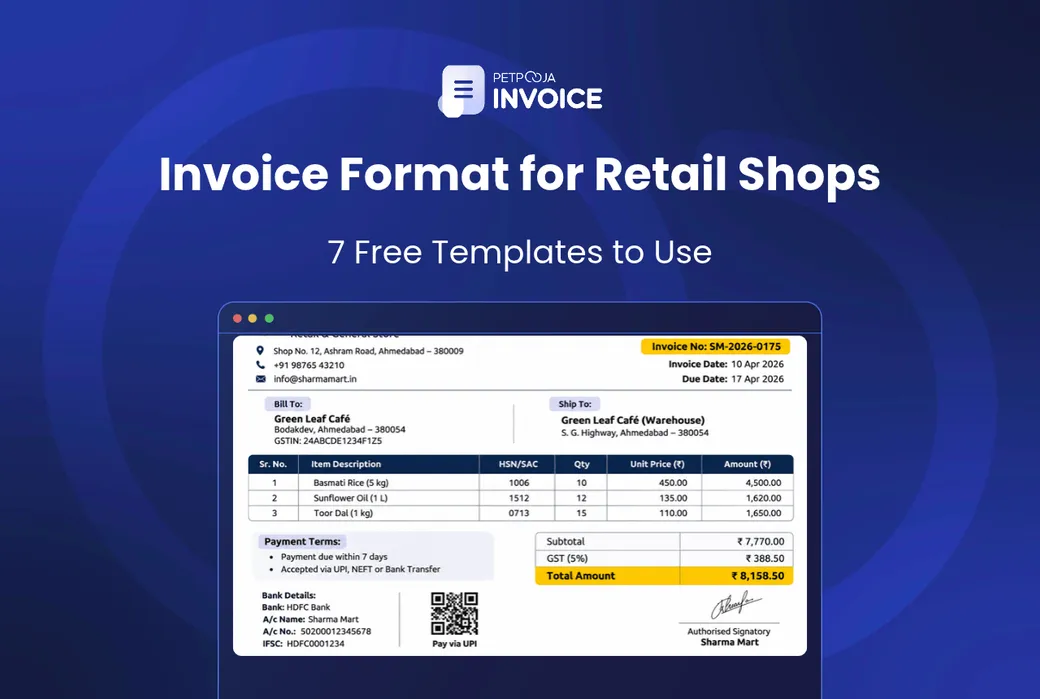



A retail shop in India bills on one of 7 main invoice formats. An invoice format is the layout of the bill you hand a customer, and which one you print depends on your GST registration, the goods you sell and who is buying.
Three of the seven are tax invoices: two for business buyers and one for walk-in customers. The other four are a bill of supply, an invoice-cum-bill of supply, a proforma invoice and a simple bill for shops outside GST. People also call these a bill format or an invoice bill format, and the rules are the same whatever the name.
This guide shows all 7 invoice formats as free printable templates, with the fields each must carry. It also covers three counter rules on customer details, product codes and small bills, and how to make an invoice step by step.
Key Takeaways
- Your GST status, what you sell and your buyer decide which of the 7 formats you print. A regular GST shop that sells to walk-in customers and businesses needs at least two of them ready.
- A shop outside GST must never print a GST line, because the law does not let it collect the tax.
- Pick the format before you print a batch of bill books, or every wrong field repeats on every page.
Which Invoice Format Does Your Retail Shop Need?
The invoice format your retail shop needs comes from 7 checks, made in this order. Stop at the first one that fits your sale. The Central GST (CGST) Act, section 31 sets out which document a registered shop issues.
| Check These in Order | Invoice Format to Use |
|---|---|
| 1. Is your shop outside GST (not registered)? | Simple bill, with no GST |
| 2. Is the sale still a quote before an order? | Proforma invoice, then the real bill once the sale is made |
| 3. Are you a composition shop, or is this sale only exempt goods? | Bill of supply |
| 4. Is an unregistered customer buying taxed and exempt goods together? | Invoice-cum-bill of supply |
| 5. Is the buyer a registered business, with goods staying in your state? | GST tax invoice with CGST and State GST (SGST), or Union Territory GST (UTGST) in a union territory |
| 6. Is the buyer a registered business, with goods going to another state? | Integrated GST (IGST) invoice |
| 7. Is it a walk-in customer buying taxed goods? | Sales bill with GST, the shorter tax invoice used at the counter |
Each answer points to one of the 7 formats below, all shown as free templates.
7 Invoice Formats for Retail Shops, With Free Templates
The 7 invoice formats Indian retailers use are below, each as a free printable template with its fields in place.
To use a template, save the picture and print it. On a computer, right-click it and choose “Save image as”. On a phone, press and hold it. Then fill in the blanks by hand. Six of the seven also have a free Excel version for filling in on a computer, named under each format. Our template pages send the Excel file to your email.
1. GST Tax Invoice Format for Sales Within Your State
A GST tax invoice for a sale within your state is the bill a registered shop gives a registered business buyer when the goods are delivered in the same state. Both sides show their GST Identification Number (GSTIN). It is an invoice with GST split into CGST and SGST, half each.
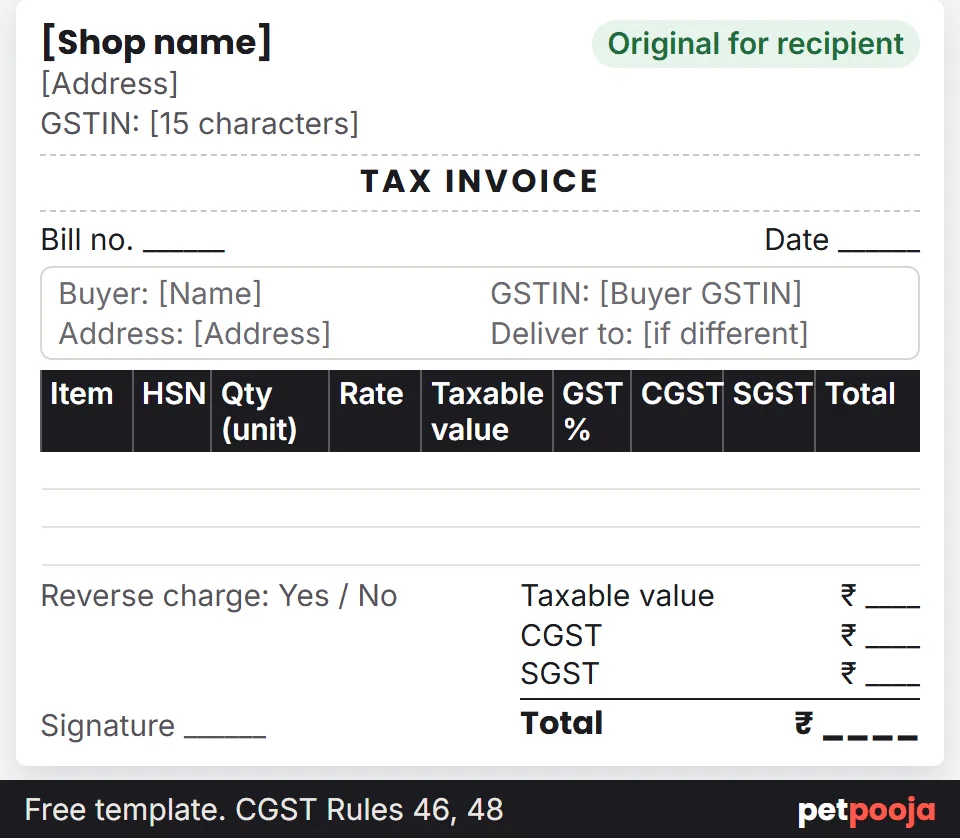 Free template: GST tax invoice for sales within your state.
Get it free in Excel as the Tax Invoice sheet in our GST invoice template.
2. IGST Invoice Format for Sales to Another State
An IGST invoice is the tax invoice for a sale to a business where the goods go to another state. It differs from the same-state tax invoice in two ways. IGST replaces CGST and SGST, and the bill names the place of supply, which is the state the goods go to.
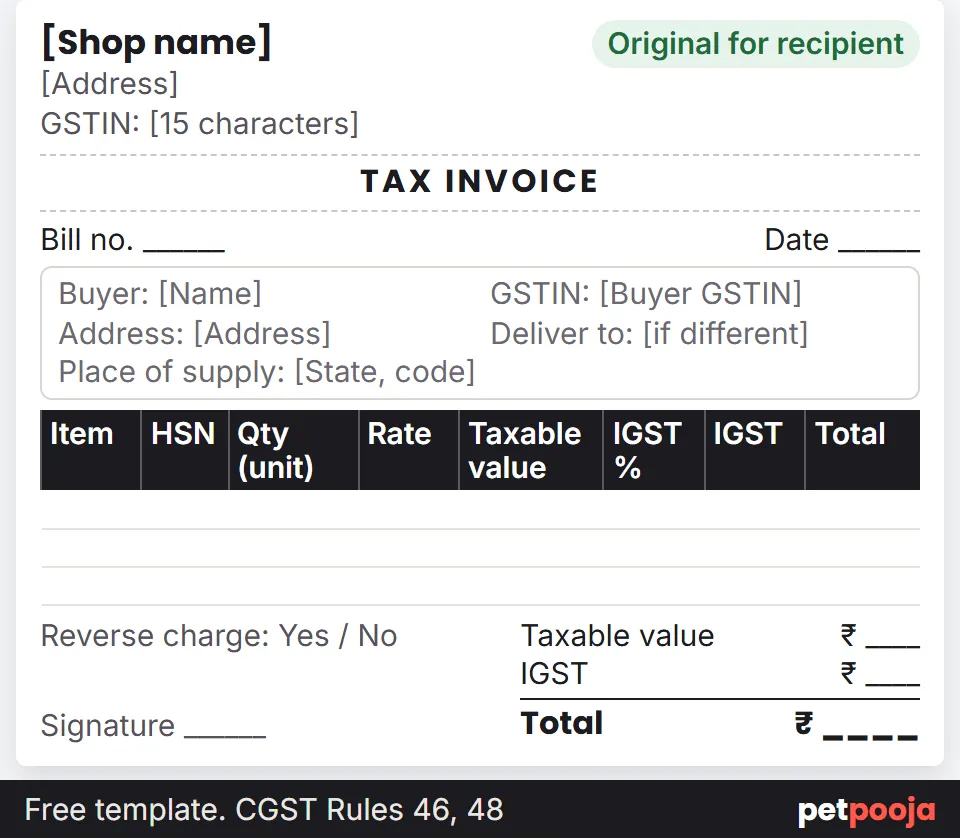 Free template: IGST invoice for sales to another state.
CGST Rule 46 asks for the place of supply on these bills. Take a saree wholesaler in Surat who bills a boutique in Bengaluru (an example). That bill uses IGST and names Karnataka as the place of supply.
To fill this format in on a computer, use the Tax Invoice sheet in the GST invoice template linked under format 1. It switches from CGST and SGST to IGST when the state code you enter for the sale differs from your own.
3. Sales Bill Format With GST for Walk-In Customers
A sales bill with GST is the counter bill a registered shop gives a walk-in customer who is not registered. It does not need the buyer’s GSTIN. The customer’s details go on it only for bigger bills, or when the customer asks.
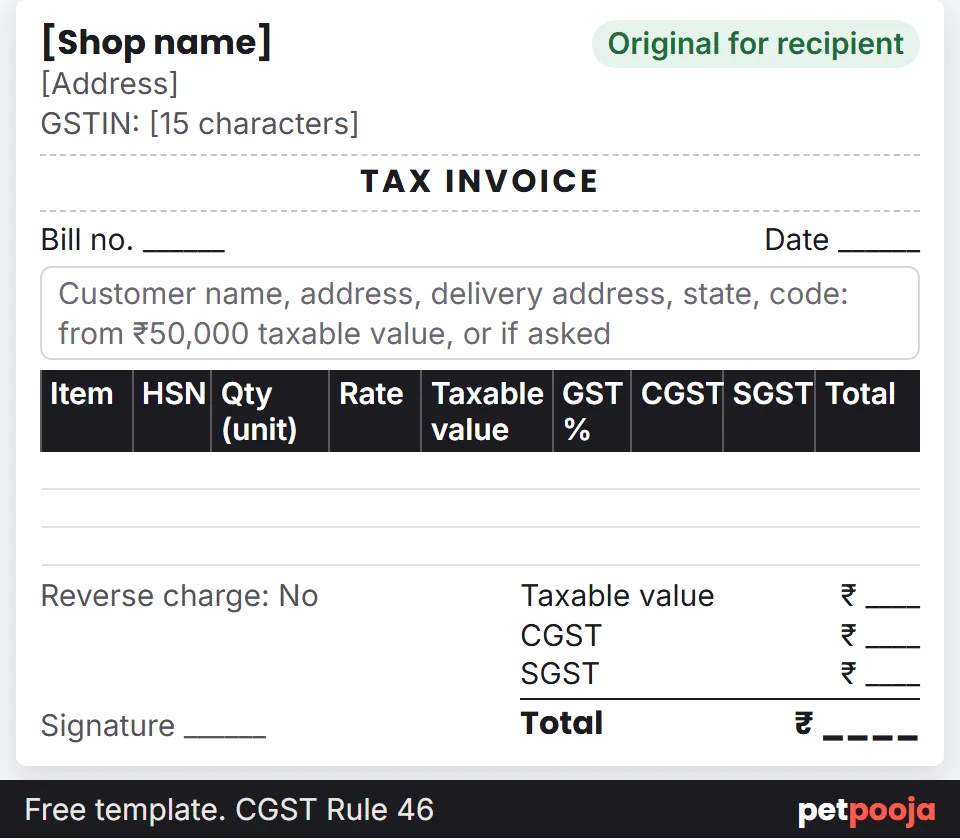 Free template: sales bill with GST for walk-in customers.
Our free cash memo template has this counter bill as an Excel sheet that works out the GST from a price that already includes it. For a clothing shop, our clothing shop bill format is a ready-made version.
4. Bill of Supply Format for Composition and Exempt Sales
A bill of supply is the format for sales where the shop does not charge GST to the customer. A composition shop uses it, because it pays GST at a fixed rate on its own turnover and cannot charge GST to the customer. A regular shop selling GST-exempt goods uses it too, and CGST Rule 49 lists the fields a bill of supply needs.
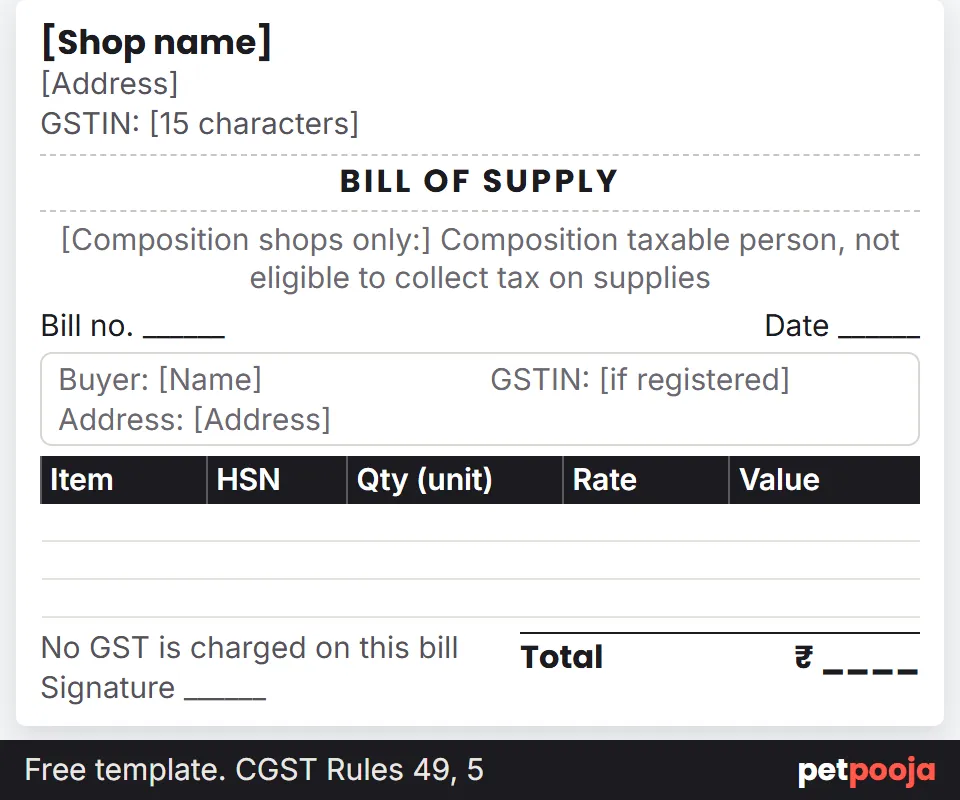 Free template: bill of supply, with no tax columns.
A composition shop also prints a fixed line at the top: “composition taxable person, not eligible to collect tax on supplies”. That line comes from CGST Rule 5. The Bill of Supply sheet in the GST invoice template, linked under format 1, has this layout.
5. Invoice-cum-Bill of Supply Format for Mixed Sales
An invoice-cum-bill of supply is one bill for an unregistered customer who buys taxed and GST-exempt goods together. Take a kirana store in Pune that sells one walk-in customer some taxed items and some exempt items in the same visit (an example).
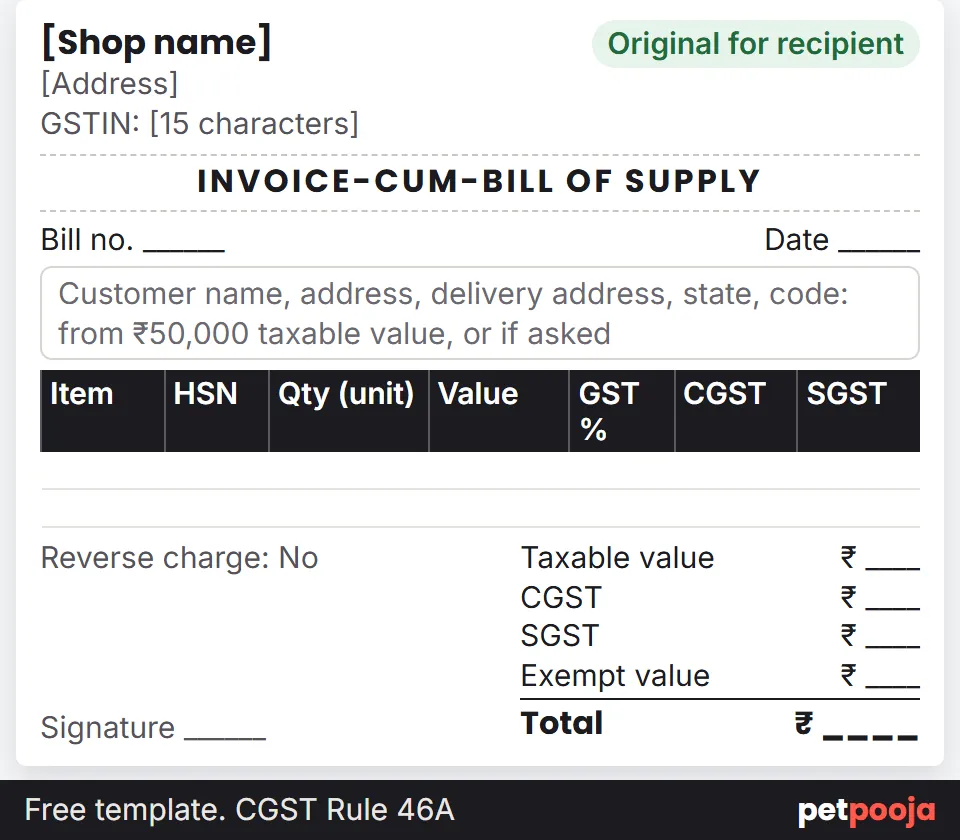 Free template: invoice-cum-bill of supply for taxed and exempt items on one bill.
CGST Rule 46A allows this single bill when a registered shop sells both kinds of goods to an unregistered buyer, so the customer does not get two bills. A simple way to fill in exempt lines is to write “Exempt” in place of the tax, with nil CGST and SGST. The cash memo template named under format 3 also has an invoice-cum-bill of supply sheet in Excel.
6. Simple Bill Format (Kacha Bill) for Shops Outside GST
A simple bill is what a shop that is not registered under GST gives its customers: no GST and no GSTIN on it. People sometimes call it a kacha bill or a hand bill.
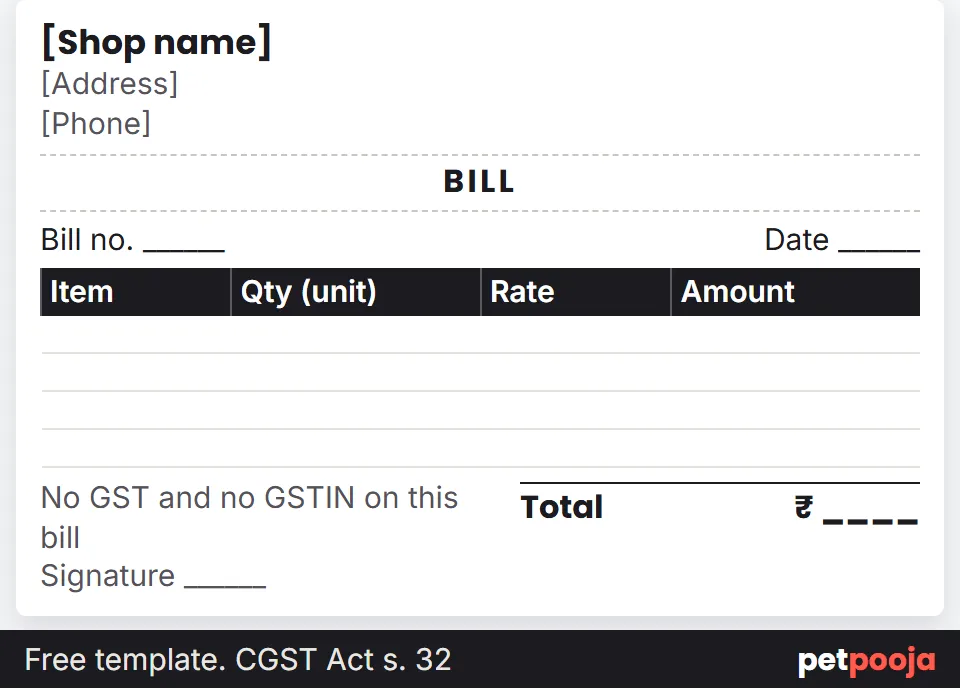 Free template: simple bill for shops not registered under GST.
Never add a GST line: under CGST section 32, a person who is not registered cannot collect any amount by way of tax. This format has no Excel version, so save the picture and print it to use it.
7. Proforma Invoice Format Before a Bulk Order
A proforma invoice is a draft bill sent before the sale, so a business buyer can approve the price or pay an advance. It is not a tax invoice, and it says so at the top.
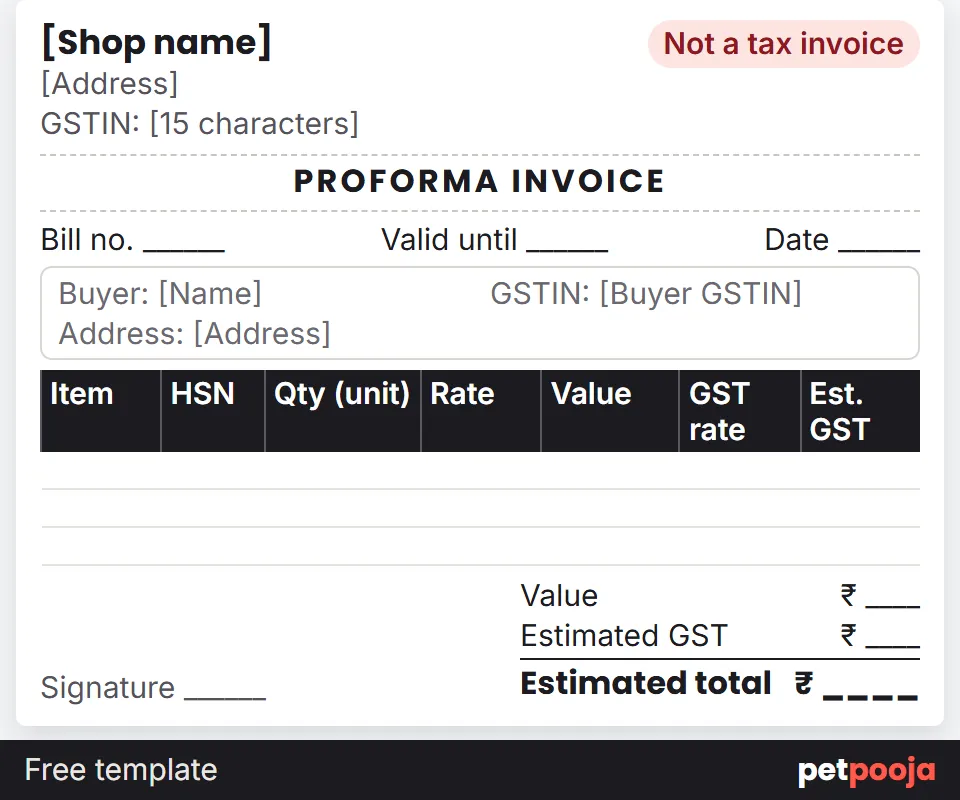 Free template: proforma invoice, marked not a tax invoice.
If the buyer pays an advance, section 31(3)(d) of the CGST Act asks for a receipt voucher for that payment. Our free Excel proforma invoice template includes a receipt voucher.
All 7 templates above can be printed as they are. Words in square brackets show what to fill in, or what to leave out. The next section lists the fields a GST tax invoice must carry, so you can check any tax invoice format you already use.
What a GST Tax Invoice Format Must Include
The core details of a GST tax invoice format are listed in CGST Rule 46. For a retail shop selling goods to a business buyer, these are the fields to print. Some apply only to certain sales:
- Your shop’s name, address and GSTIN
- A consecutive serial number of up to 16 characters, unique for the financial year
- The date of the bill
- The buyer’s name, address and GSTIN
- The Harmonised System of Nomenclature (HSN) code, description, quantity and unit of each item
- The total value of the goods
- The taxable value after any discount
- The GST rate and amount, split as CGST and SGST (UTGST in a union territory), or as IGST
- For a sale to another state, the place of supply and the name of that state
- The delivery address, if it differs from the place of supply
- Whether tax is payable on reverse charge (the buyer pays the GST instead of you)
- Your signature, or a digital signature
Shops that must issue e-invoices to business buyers add one more detail. Each e-invoice carries a QR code holding its Invoice Reference Number (IRN), which the government e-invoice system returns for that bill.
Tax invoices for goods are made in three copies. Each copy carries a label: “Original for recipient”, “Duplicate for transporter” or “Triplicate for supplier”. The three-copy rule does not apply to e-invoices. This comes from CGST Rule 48.
A bill of supply, a simple bill and a proforma invoice carry fewer fields, as their templates in this guide show.
Three Invoice Format Rules Retail Shops Must Know
Three invoice rules decide what a retail counter bill must show, and when no bill is needed: the ₹50,000 limit, the number of HSN digits, and small bills under ₹200.
Customer Details on a Retail GST Bill From ₹50,000
A walk-in bill must show the customer’s details when the taxable value is ₹50,000 or more, or when the customer asks. These are the name and address, the delivery address, and the state with its code. Rule 46 sets that limit, and it counts the value before GST, not the total the customer pays.
Take a ₹45,000 television sold to a walk-in customer in Ahmedabad, with 18% GST making the total ₹53,100 (an example). The taxable value is under ₹50,000, so that bill does not need the customer’s details unless they ask.
HSN Code Digits on a Retail Invoice by Turnover
The number of HSN digits on a retail invoice depends on your turnover, and the rule has applied since April 2021. Under Notification 78/2020, a shop whose turnover in the previous financial year was up to ₹5 crore uses 4 digits, and above ₹5 crore it uses 6. A shop up to ₹5 crore may also leave HSN off bills to unregistered customers.
Consolidated GST Invoice for Retail Sales Under ₹200
For a sale under ₹200 to an unregistered customer who does not want a bill, the shop need not issue one. It must instead raise one consolidated invoice for all such sales at the close of each day. Section 31(3)(b) of the CGST Act and Rule 46 set this rule. Our free cash memo template, linked under format 3, has a day-end sheet for this consolidated invoice.
How to Make an Invoice for Your Retail Shop in 5 Steps
To make a GST invoice for a retail shop, pick the format, fill in your shop details once, then add each sale line by line. A shop outside GST follows the same steps but leaves out the GSTIN, the HSN code, the tax and the reverse charge line.
- Pick the format for the sale. Do this before typing anything, because a walk-in customer and a business buyer usually need different bills.
- Put your shop details at the top. Your name, address and GSTIN stay the same on every bill. Add the title for the format, such as “Tax Invoice” or “Bill of Supply”.
- Give the bill a number and a date. Number each bill in order, such as 26-27/0001, 26-27/0002.
- Add each item. Enter the HSN code. A shop with turnover up to ₹5 crore can skip it on bills to unregistered customers. Then add the quantity and rate, then take off any discount. GST is worked out on the price after discount, as our guide to GST on discounts explains. Add CGST and SGST for a sale in your state, or IGST for one outside it.
- Total it and hand it over. Add the totals, the reverse charge line and your signature. Print three copies of a tax invoice for goods (e-invoices are the exception), and send the customer a PDF too if they want one.
To generate an invoice without a template, a free online invoice generator makes a GST bill and downloads it as a PDF.
Should You Make Bills in Excel, Word or PDF?
Use Excel to make the bill, Word to have a bill book printed, and PDF to send the bill.
- Excel, with formulas in the sheet, works out the GST, the taxable value and the total, so nobody adds up by hand.
- Word is a file a printing press can work from. Send the press your bill design, and it prints a bill book, with carbon copies if you want them.
- PDF is how you send a finished bill on WhatsApp or email, and it is the copy the customer keeps.
A bill template suits a shop with a few bills a day. Typing every bill into a sheet gets slower as the number of customers grows. Our comparison of manual billing and software shows when software becomes the faster option.
How Petpooja Invoice Helps With Retail Invoice Formats
Petpooja Invoice is built for retail businesses that bill on GST every day. Its product page says it generates invoices that follow the latest GST laws, and it works out the GST on every invoice. 8,000+ businesses use Petpooja Invoice.
Here is what it offers for billing in these formats:
- Walk-in bills and business invoices: retail POS billing and business-to-business (B2B) billing from the same system, with barcode scanning to speed up the counter.
- E-invoices and e-way bills: both are on its product page. E-invoices are needed for sales to businesses once your turnover has crossed ₹5 crore in any financial year since 2017-18. Some sectors are exempt. That rule has applied since August 2023 under Notification 10/2023.
- Sending bills: a WhatsApp E-Bill, so the customer gets the bill on their phone.
- More than one counter: multi-user and multi-counter billing, with real-time inventory.
- Your accountant: GST return reports and a Tally integration. Its product page lists GSTR-1, 2 and 3B reports.
Built-in AI for retail: its product page also lists AI features that sit in the same system as your billing. They are an AI Inventory Agent, Purchase AI, AI Theft Detection and a Garment AI Try-On.
Its product page names supermarkets, garment stores and electronics stores among the businesses it is built for. You can see your own bill formats in a free demo. For a wider look at tools, our list of the best retail billing software compares the options.
Conclusion
For Indian retailers, the right invoice format depends on your GST status, the goods you sell and who you sell to. A regular GST shop that sells to both walk-in customers and businesses uses at least two of the seven: one at the counter and one for business buyers. Composition shops use a bill of supply, and shops outside GST use a simple bill with no tax on it.
Start by checking your GST status, then print the template for each format you need.
When your shop bills more customers than a sheet can keep up with, Petpooja Invoice prints your GST bills with the tax worked out. It handles both the counter bill and the business invoice.
This guide explains the rules in general terms and is not legal or tax advice. For your situation, check the official notification or speak to a qualified professional.
Frequently Asked Questions
What Is the Difference Between an Invoice and a Bill?
In everyday shop talk there is none: both mean the paper a customer gets for a sale. Under GST the legal name depends on the sale. It is a tax invoice when GST is charged, a bill of supply when a registered shop does not charge it, an invoice-cum-bill of supply when one bill has both, and a simple bill when the shop is outside GST.
Can Each Billing Counter Have Its Own Invoice Number Series?
Yes, each counter can run its own series, because CGST Rule 46 allows more than one series. A prefix for each counter, such as C1/ for counter 1 and C2/ for counter 2, keeps the series apart. A fresh series can start each April.
What Is the Meaning of Invoice Value on a Bill?
The invoice value is the total the customer pays, including GST. The taxable value is the price before GST and after any discount. A bill shows both, because GST is worked out on the taxable value. A free GST invoice value calculator works one out from the other.
Can a Shop Change Its Invoice Format Midway Through the Year?
Yes, a shop can change the layout at any time, as long as every required field stays on the bill. If your turnover has crossed the ₹5 crore e-invoice limit and you sell to businesses, our guide to e-invoice software covers how to generate an e-invoice.
Thanks. This helps us make the next article better.

Avani Joshi is a Content Writer at Petpooja, where she writes about payroll, billing, and the everyday software that keeps Indian SMEs running. She has a knack for taking complicated topics and explaining them in plain language for business owners who don't have time to decode jargon.

Comments
Loading comments…