
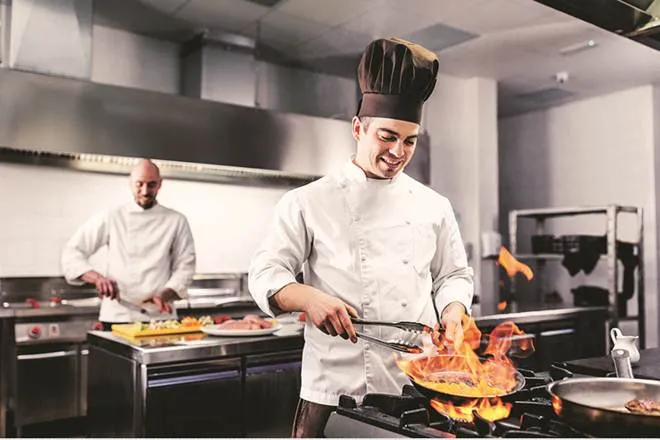



You run a multi-brand cloud kitchen without mix-ups by keeping two things apart. What the customer sees stays separate for each brand: the menu, the app listing, the box and the label. What happens in the kitchen runs as one system: shared prep, one order screen, stations and a packing check on every order.
If you already run two or more brands from one kitchen, you know the mix-ups. A rider leaves with the wrong brand’s bag. A dish that ran out is still live on one brand’s listing. One slow brand holds up the others at 8 PM. And at the end of the month, nobody can say which brand made money.
This guide gives you 7 steps to fix them, starting with what your brands share. It also covers what one more brand costs, and which licences carry over.
Key Takeaways
- Keep each brand separate for customers, and run one kitchen behind them.
- Start by sorting what your brands share from what each needs alone.
- Then keep every brand’s menu right on every app.
- Next, take all orders on one screen.
- Then route each dish to the right station.
- Next, pack every brand with its own checklist and shelf.
- Then cross-train your team across every brand.
- Finally, track each brand’s numbers every week.
What Is a Multi-Brand Cloud Kitchen?
A multi-brand cloud kitchen is one delivery-only kitchen that sells food under two or more brand names. A cloud kitchen, also called a ghost kitchen or dark kitchen, has no dining area and serves only delivery orders (cloud kitchen meaning).
To the customer, each brand looks like a separate restaurant, with its own name, menu and app listing. These brands are often called virtual brands or virtual restaurants. Behind them, one team cooks every brand in the same kitchen.
Large Indian operators work this way. Rebel Foods runs brands such as Faasos, Behrouz Biryani, Oven Story and Sweet Truth. Rebel Foods also sells its brands together on its own app, EatSure.
Kouzina FoodTech runs brands such as Indiana Burgers, Kaati Zone, Warm Oven and Momo Zone.
For the companies leading the market, see our list of the best cloud kitchens in India.
A multi-brand cloud kitchen is different from a central kitchen. A central kitchen preps food and sends it to other outlets. A multi-brand cloud kitchen cooks finished orders for customers, under two or more names.
| Shared across brands | Kept separate for each brand |
|---|---|
| Kitchen space, rent, gas and electricity | Brand name, menu and prices |
| Cooks and stations | Box, label and packing checklist |
| Common ingredients such as rice, onions and spices | Listing on each delivery app |
| Equipment such as stoves and fridges | Brand-only stock and recipes |
The left column is where you save money. The right column is what each brand must keep to itself, and the 7 steps help keep it that way.
1. Decide What Your Multi-Brand Kitchen Shares or Splits
Many mix-ups start when two brands share something nobody planned for. So look at the brands you already run, and sort what they share from what each one needs for itself.
Which Ingredients Do Your Brands Share?
Pull up your current menus and list the ingredients each dish uses. Mark the ones that appear in more than one brand. This is your ingredient overlap.
Shared ingredients can be prepped once, in a batch, before the rush:
| Shared base (an example) | Used by |
|---|---|
| Marinated chicken | Biryani brand, kebab and roll brand |
| Fried onions | Biryani brand, kebab and roll brand |
| Mint chutney | Biryani brand, kebab and roll brand |
One batch for both brands means one recipe, one person and one check. It also means a mistake in that batch reaches both brands, so taste it before the rush starts.
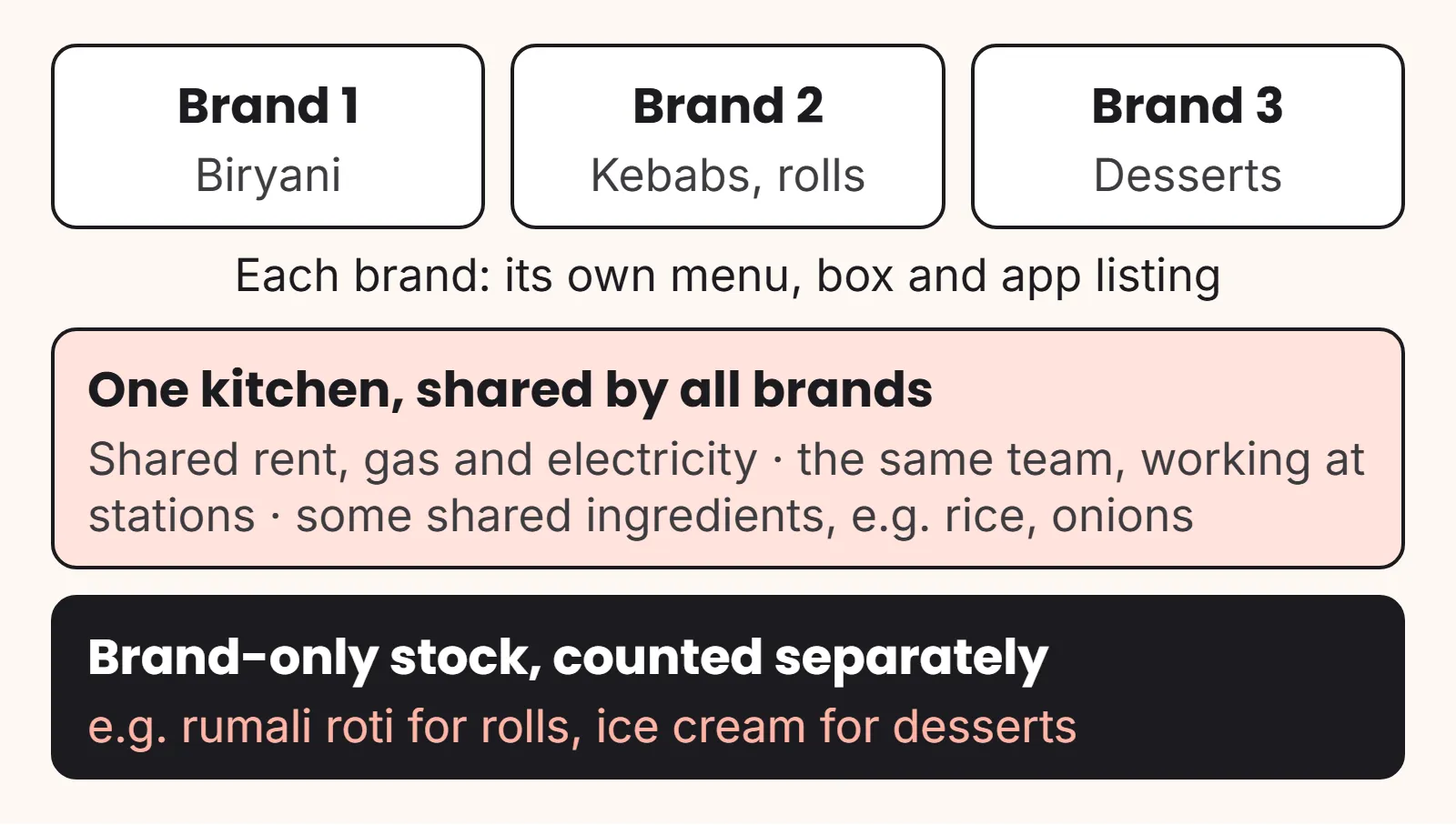 How three brands share one kitchen and keep their own stock (an example).
Count the brand-only stock separately from the shared stock. When a brand-only item runs out, only the dishes that use it stop.
Decide Which Brands Need Their Own Setup
Some brands you run may not share well. If one keeps slowing the others, ask three questions about it:
- Does it cook the same way as your other brands?
- Does it use the same equipment?
- Does it get busy at the same hours as your other brands?
A brand that cooks the same way, uses the same equipment and gets busy at different hours shares easily. A brand that gets busy at the same hours as the others needs a station with room at that hour. A brand that cooks differently or needs other equipment needs some space of its own. For example, a dessert brand needs cold prep, and a pizza brand needs an oven whose longer bake time can hold up quicker orders. Move such a brand to its own corner, or prep it in quiet hours, so it stops slowing the rest.
Keep Veg and Non-Veg Prep Apart
A pure veg or Jain brand often shares a kitchen with brands that cook chicken and mutton. FSSAI asks every food service business to show the veg or non-veg mark against each dish on its menu (FSSAI labelling rules). A veg brand’s customers trust that mark.
Give the veg brand its own counter, utensils, oil and fridge shelf. Label its containers in a colour your team can spot from across the kitchen. One mix-up here can lose the brand its regular customers for good.
2. Keep Every Brand’s Menu Right on the Apps
Each brand needs its own menu on every app. And every menu must show only what you can cook right now.
Copy a Menu Without Copying Its Mistakes
Many owners start a new brand by copying an existing menu and changing it. That saves time, but old details slip through. A dish keeps the old brand’s name, or a price stays the same when it should not.
After you copy a menu, check each dish’s name, price, photo and add-ons, such as extra cheese or a bigger portion. Set each brand’s opening hours too. A dessert brand may open later and close later than a lunch brand.
Switch a Sold-Out Dish Off Everywhere at Once
Link every dish to the ingredients it uses. This is called ingredient mapping. Then, when one ingredient runs out, you know every dish it affects, and menu sync, which sends one change to every app at once, can switch them all off together.
Say the marinated chicken runs out at 9 PM. The kebabs, the chicken roll and the chicken biryani all need it, across two brands. If even one of them stays live on Swiggy, Zomato or ONDC, orders come in and get cancelled. Cancellations hurt that brand’s rating. Switch all of them off together, on every app.
Place a Test Order After Every Menu Change
After any change to a menu, order one dish from the brand’s own listing. Check the price, the add-ons and the kitchen ticket that prints. It is far better that you find a wrong price than a customer does.
3. Bring All Brands’ Orders Onto One Screen
When every brand’s orders arrive on one screen, nobody misses an order on a tablet in the corner.
Accept and Check Orders in One Place
Three brands on two apps can mean six tablets on one counter. In the rush, one of them goes unnoticed, and the order waits.
Bring every order onto one screen instead. Then check each order before it goes to the kitchen. Look at the items, the add-ons and any note such as “no onion”. If you miss it here, the onion goes into the dish.
Put the Brand Name on Every Ticket and Bag
Every ticket and every bag should show two things: the brand name and the order number. The cook, the packer and the rider then all read the same two details.
Use a sticker or a stamp on each bag. Your delivery packaging ideas can include a different colour for each brand.
Pause a Brand When the Kitchen Is Overloaded
Some nights, one station falls behind. If the fryer has 15 orders waiting, every brand that uses it will run late.
The delivery apps let you take a listing offline for a while. Pause the brand that sends the most orders to that station, and let the others keep selling. A short pause on one brand helps protect the others’ ratings.
4. Route Every Dish to the Right Station
Send each dish to the station that cooks it, whatever brand it belongs to.
Lay Out the Kitchen From Prep to Pickup
Look at how food moves through your kitchen today. It should move one way: prep, then cooking, then packing, then the rider.
- Keep prep and packing in separate zones, so raw food and finished bags do not meet.
- Put the rider pickup point near the door, so riders do not walk into the kitchen.
- Keep shared ingredients where every station can reach them.
- Cut the number of people crossing paths at peak hours.
You do not need a new kitchen for this. Moving a shelf or a packing table often fixes the worst crossing point.
Split Stations by Cooking Method
Set up stations by how food is cooked. A tandoor, a stove, a wok, a fryer and a cold station usually cover an Indian delivery menu. One stove cook can make biryani for one brand and rolls for another.
Send each dish’s kitchen order ticket (KOT) to the station that cooks it. A kitchen display system (KDS) shows these KOTs on a screen at each station.
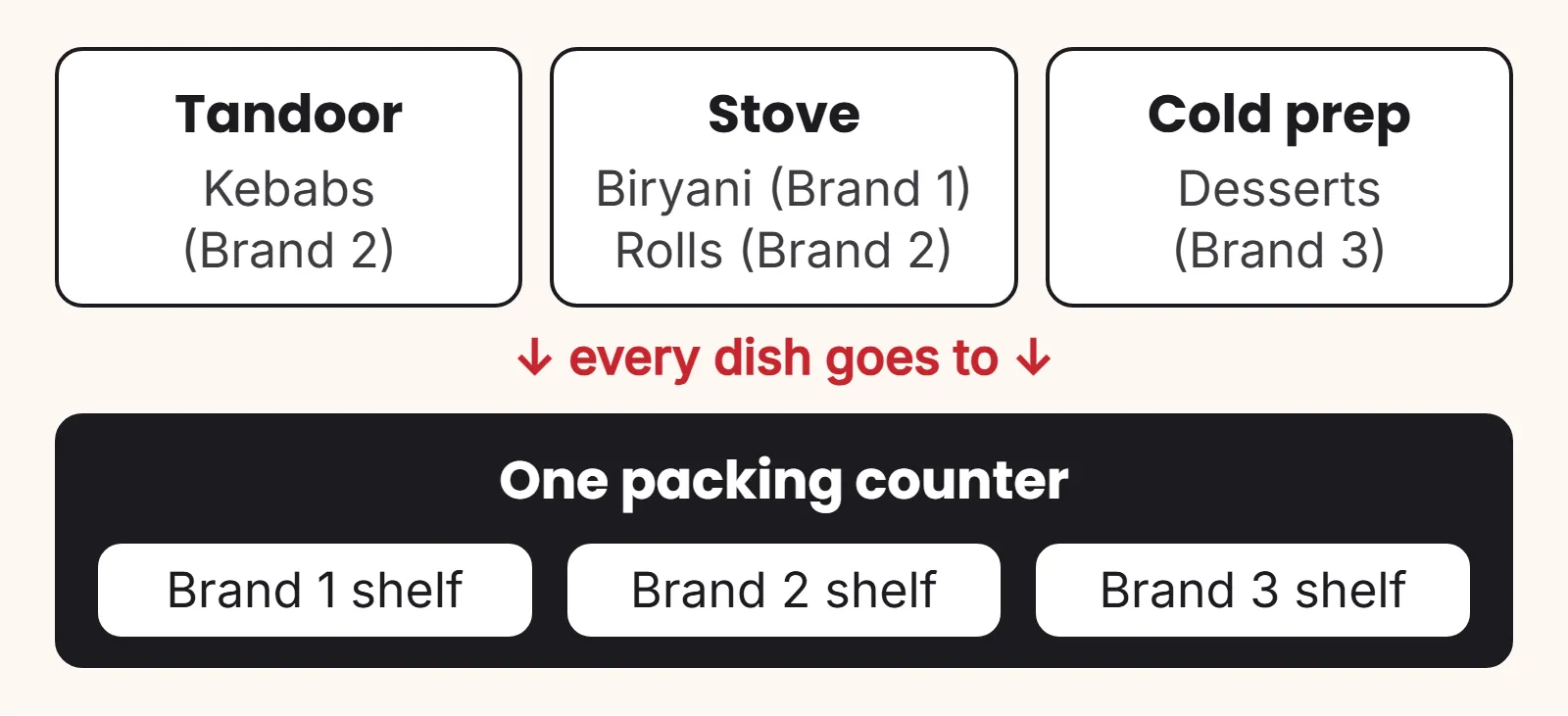 A station map for three example brands.
Brands that cook the same way share a station, and the packing counter keeps their orders apart.
Let One Person Check the Whole Order
One customer can order a kebab from the tandoor and a chicken roll from the stove, both from your kebab and roll brand. Each cook sees only their own dish, so nobody sees the whole order.
Put one person at the pass, where finished food comes out. This person, often called the expeditor, checks that every dish in an order is there before it goes to packing. On a busy night, this check catches a missing dish before the bag is sealed.
5. Pack and Hand Over Every Brand Separately
Many mix-ups happen at the packing counter, in the last minutes before handover.
Use a Packing Checklist for Every Box
Each brand packs differently. One needs raita and a spoon, another needs ketchup and a fork. Pin a short checklist for each brand at the packing counter:
- the right box and bag for that brand
- cutlery
- sauces, chutneys and sides
- a tamper-proof seal on the bag
The packer ticks it off for every order. It takes seconds, and it cuts down on “my raita was missing” reviews.
Give Riders a Shelf by Brand
At the end of the packing counter, next to the rider pickup point, keep one shelf for each brand, with the order number facing out. A rider asks for the brand and the order number, and the bag is easy to find.
Note how long riders wait for each order. If riders still wait after the food is cooked and checked, the hold-up is at packing.
6. Cross-Train Your Team Across Every Brand
A team that can cook every brand keeps going when one cook is absent.
Fix Recipes That Drift Between Cooks
The same dish can taste different when two cooks make it. Over weeks, portions grow and spice levels change.
Write a recipe card for every dish. Add the portion weight and a photo of how it should look in the box. Taste a few dishes from each brand every week, and compare them with the card.
Teach Every Cook One More Station
Train each cook on at least one station beyond their own. Then, when someone is absent or one station is flooded, another cook can step in.
Cross-training also helps in quiet hours. One cook can cover two stations and prep for the next rush.
Name One Lead for Prep and One for Dispatch
Some jobs need one fixed owner, every shift:
- A prep lead owns the batch prep before each rush.
- A dispatch lead owns the check at the pass, packing and the rider shelves.
Write down who holds each role on each shift. Use a short handover checklist when shifts change, so the next team knows what is prepped and what is running low.
Limit Who Can Change Menus and Prices
Only one or two people should be able to change menus, prices or stock settings. Cooks only need to see orders. Write these rules into your standard operating procedure (SOP), so a new staff member learns them on day one.
7. Track Every Brand’s Numbers Weekly
Weekly numbers show which brand is slipping, and which brand earns its place.
Which Numbers Show a Brand Is Slipping?
Check these for each brand, every week:
- number of orders and average order value
- cancellation rate, the share of orders cancelled
- prep time and rider handoff time
- ratings and repeated complaints
- food cost as a share of sales (our guide to knowing your food cost shows how to work it out)
Look at each brand on its own. The kitchen’s total can hide one weak brand.
How Much Does Each Brand Really Earn?
Sales alone do not show what a brand earns. For each brand, take its sales and subtract its food cost, packaging, app commission and ads. What is left is what the brand earns before shared costs.
Then split the rent and staff costs between brands by each one’s portion of orders. A brand with 20% of orders carries 20% of the rent. If a brand earns less than its share of the rent and staff, look at what else its cooking time could make. Giving that time to a brand that sells better may earn you more.
When Should You Drop or Add a Brand?
Watch for these signs at peak hours:
- dishes take longer than their set prep time
- one brand’s ratings start to fall
- brand-only stock runs out more often
- the packing counter backs up
There is no fixed number of brands one kitchen can run. The limit is what your stations and team can handle at the busiest hour, and these signs often mean you have reached it.
Also watch for brand cannibalisation. That is when a new brand takes orders from your own older brand instead of from new customers. Two brands selling similar food in the same area often do this.
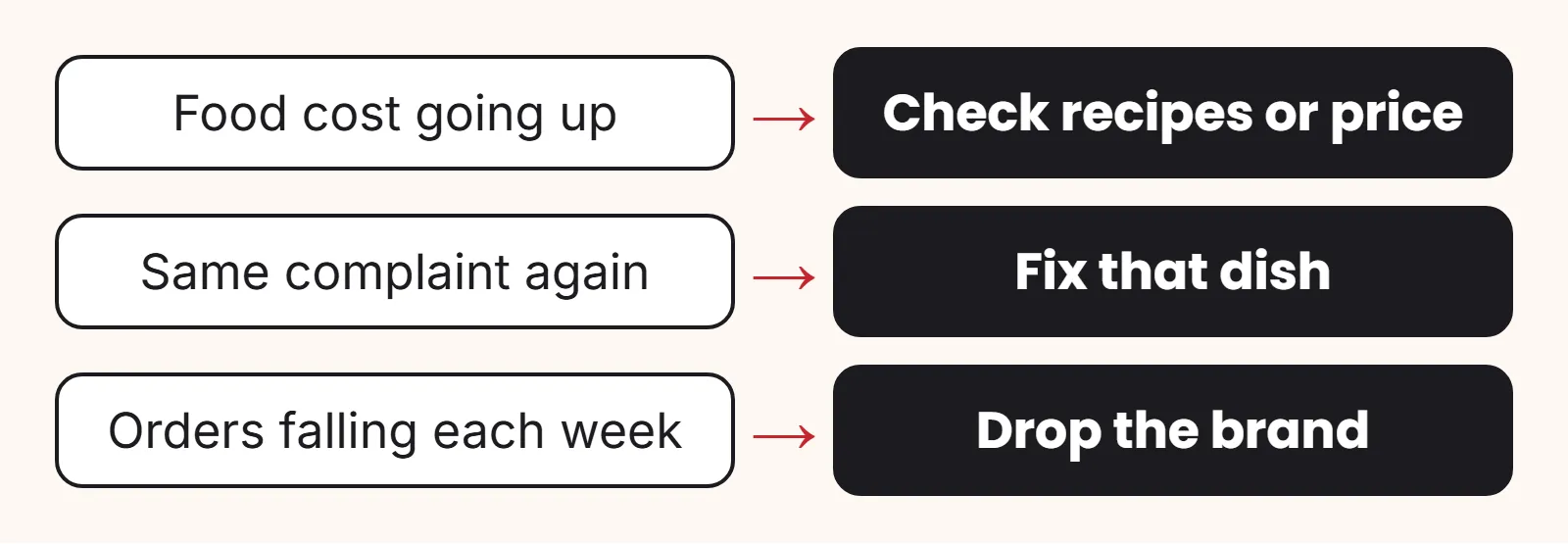 What to do with each finding from the weekly brand check.
Drop a brand when its orders fall week after week, or when its station time would earn more on your other brands. Add a new brand only when the weekly numbers look steady, and when your workflow, roles and layout can take the extra orders.
How Much Does a Multi-Brand Cloud Kitchen Cost in India?
Adding one more brand to a kitchen you already run costs about Rs 25,000-75,000 to set up, before any new equipment, packaging stock and launch offers. For comparison, Kouzina FoodTech puts a whole new partner kitchen at about Rs 10-15 lakh, depending on the city, kitchen size and equipment.
How Much Does It Cost to Add One More Brand?
The Rs 25,000-75,000 is the sum of four one-time costs for a new brand:
| One-time cost for one brand | Typical cost | Source |
|---|---|---|
| Listing fees for one more brand | Rs 5,000-15,000 | Forkcast, 2026 |
| Logo, brand story and menu design | Rs 5,000-20,000 | Kouzina FoodTech, 2025 |
| Food photography | Rs 5,000-15,000 | Kouzina FoodTech, 2025 |
| Label and bag design | Rs 10,000-25,000 | Forkcast, 2026 |
| Total | Rs 25,000-75,000 | Our sum of the rows above |
Forkcast gives the listing figure for each extra brand. The design, photography and label rows are what Kouzina and Forkcast quote for a new kitchen’s own brand, and a second brand needs the same three things. Treat all four as typical ranges. A brand that reuses your current box design or photos can cost less than this, and listing on more apps can push it higher.
What Does a New Brand Need to Launch?
On top of the setup costs, a new brand needs:
- its own packaging stock, such as boxes, bags and labels
- its own stock of any brand-only ingredients
- launch offers or discounts to get its first orders
- a few weeks of test orders and recipe changes
Our cloud kitchen marketing tips cover how to get a new brand its first orders.
Which Costs Stay the Same When You Add a Brand?
Rent stays the same, gas and electricity rise only with the extra cooking, and your licences usually carry over too. Your team stays the same size as long as the stations have room at peak hours.
Equipment and stock do grow. Forkcast estimates that a multi-brand cloud kitchen spends 20-30% more on equipment and inventory than a single-brand one. How much depends on the new brand’s cuisine: a pizza brand may need an oven, and a dessert brand may need more cold storage. Price any new equipment before you launch the brand.
What Does Each Brand Cost Every Month?
Each brand keeps costing money as it sells:
- App commission: each app takes a cut of every order, at the rate in your agreement with it.
- Ads on the apps: Forkcast suggests budgeting 6-10% of revenue for app ads.
- Packaging: a box, a bag and a seal for every order.
These grow with each brand’s sales, so check them in your weekly numbers.
How Many Orders Does a New Brand Need to Break Even?
Divide the brand’s one-time cost by what it earns on each order. What it earns is the order value minus food cost, packaging, commission and ads.
For example, say a new brand cost Rs 50,000 to set up and earns Rs 50 on each order. It needs 1,000 orders to pay back its setup cost. At 35 orders a day, that takes about a month. (These are example numbers.)
Do You Need a Separate Licence for Each Brand?
Usually not, because licences are tied to your premises and your business.
- FSSAI: you need one food licence or registration for each premises, and all the food business at that premises goes under it (FSSAI licensing FAQs). Check that it covers the kinds of food each brand sells.
- GST: a business gets one registration in each State or Union territory, and a new brand name is not a reason to register again (Section 25, CGST Act).
- Trademark: you can register each brand name as a trademark with IP India. It is optional, but it gives you the legal right to stop another business from using the name.
- Delivery apps: each brand gets its own listing, so check what papers each app asks for when you add one.
How Does Petpooja Help Run a Multi-Brand Cloud Kitchen?
Petpooja is a restaurant point of sale (POS) and billing system used by restaurants and cloud kitchens across India. Its cloud kitchen POS software helps with the menus, the orders, the kitchen stations and the weekly numbers.
Petpooja comes in four versions: Lite (a simple billing app), Android (runs on an Android device), Offline (keeps your data on a device in your outlet) and Electron (the desktop version). Brand-wise menus and the KDS need Offline or Electron. The automatic switch-off, full stock tracking and orders from all 15+ delivery apps need Electron.
- When one brand’s dishes end up on another brand’s menu, mix-ups follow. In Petpooja, every brand has its own tab and its own menu.
- A tablet for every app means missed orders in the rush. With online order management, orders for all your brands arrive on one screen. You accept them, print the KOT and mark food ready from there.
- A sold-out dish left live on an app turns into a cancelled order. Petpooja’s inventory management can switch off every dish that uses a raw material when it runs out, for online orders.
- Cooks lose track of paper tickets in the rush. The kitchen display system shows KOTs on a screen at each station and flags a KOT that runs past its time limit. A report shows how long each item took.
- A weak brand hides inside the kitchen’s total. Brand-wise reports split sales by brand, and each morning the automated Daily Snapshot ranks yesterday’s revenue by brand.
- Owners rarely have time to dig through reports. The Ask Me Anything AI assistant answers questions about your outlet’s data, such as “What were my top-selling items yesterday?”
To see how this works for a kitchen with more than one brand, book a free demo.
Conclusion
Mix-ups in a multi-brand cloud kitchen come from the gaps between brands. Decide what your brands share, keep every menu right on every app, and take all orders on one screen. Then route dishes by station, pack each brand with its own checklist, cross-train your team, and check each brand’s numbers every week.
Pick the mix-up that hit your kitchen most last week, and start with the step that fixes it.
Frequently Asked Questions
Can one POS handle orders for several virtual restaurant brands?
Yes. Look for a POS that keeps each brand’s menu apart, takes orders from every delivery app on one screen and shows sales brand by brand. Our post on why cloud kitchens need a POS explains why.
Is a multi-brand cloud kitchen more profitable than a single brand?
It can be, because rent, staff and equipment are shared. But it is not automatically more profitable. Each brand has to earn more than its own food cost, packaging, commission and ads, and the best brands also pay a fair share of the rent and staff.
Can a dine-in restaurant add a delivery-only brand?
Yes, if the kitchen has spare time and space. Some restaurants open a delivery-only brand only in their quiet hours, such as late at night. Keep its menu short, so it does not slow the dine-in orders.
Can I list a brand on only one delivery app?
Yes. You choose which apps list each brand. Some owners start a new brand on one app, check its orders and ratings, and then add it to the others.
How long does it take to launch a new brand from an existing kitchen?
There is no fixed time. It depends on how fast you finish the brand work and each app approves the listing. The kitchen is already running, so your own work is the brand itself: the menu and recipes, photos, packaging and the app listings. After launch, leave a few weeks of test orders and recipe changes before you judge its numbers.
Thanks. This helps us make the next article better.

Khyati Tiwari is a content writer at Petpooja. Besides that, she is always busy finding the right song for her mood. For any queries reach her at khyati.tiwari@petpooja.com
Comments
Loading comments…